Aktualisiert:

Marktdaten im Replay abspielen

Marktdaten im Replay abspielen

So kannst du historische Marktdaten erneut abspielen.

So kannst du historische Marktdaten erneut abspielen.

No headings found on page

Öffne Deepchart.

  1. Trenne alle Datenfeeds und schließe alle Preischarts.

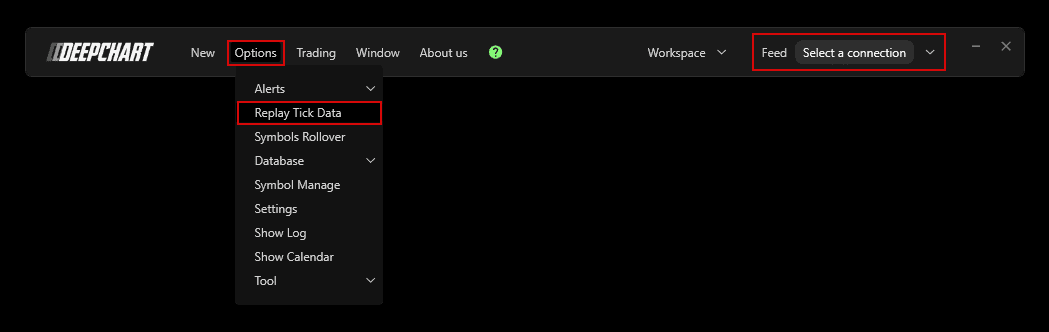
  2. Öffne Options > Replay Tick Data.

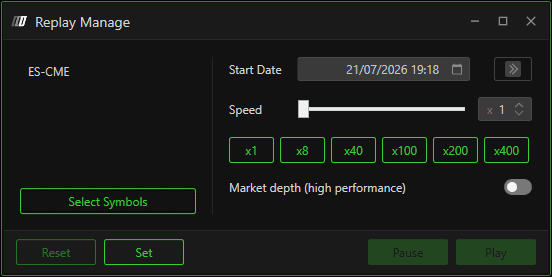
  3. Replay-Manage-Einstellungen

    1. Wähle über Select Symbols die gewünschte Börse.

    2. Klicke auf das Kalendersymbol und wähle Datum und Uhrzeit oder gib sie ein.

    3. Klicke auf Set.

  4. Lass Replay Manage geöffnet und öffne in Deepchart über New > Price chart einen Chart für die dort gewählte Börse.

  5. Wähle Play, um die Marktdaten im Chart abzuspielen.

  6. Erhöhe das Abspieltempo mit dem Speed-Regler oder einer voreingestellten Geschwindigkeit.


Tools for futures, currency & options involves substantial risk & is not appropriate for everyone. Only risk capital should be used for trading.

Testimonials appearing on this website may not be representative of other clients or customers and is not a guarantee of future performance or success.

Tools for futures, currency & options involves substantial risk & is not appropriate for everyone. Only risk capital should be used for trading. Testimonials appearing on this website may not be representative of other clients or customers and is not a guarantee of future performance or success.

Deepcharts © 2026 All right reserved

Tools for futures, currency & options involves substantial risk & is not appropriate for everyone. Only risk capital should be used for trading. Testimonials appearing on this website may not be representative of other clients or customers and is not a guarantee of future performance or success.

Deepcharts © 2026 All right reserved