Comment faire

Updated:

Rollover du symbole (modifier le code du mois du contrat)

Rollover du symbole (modifier le code du mois du contrat)

No headings found on page

Ici, vous verrez comment effectuer le symbol rollover (mise à jour du code du mois de contrat)

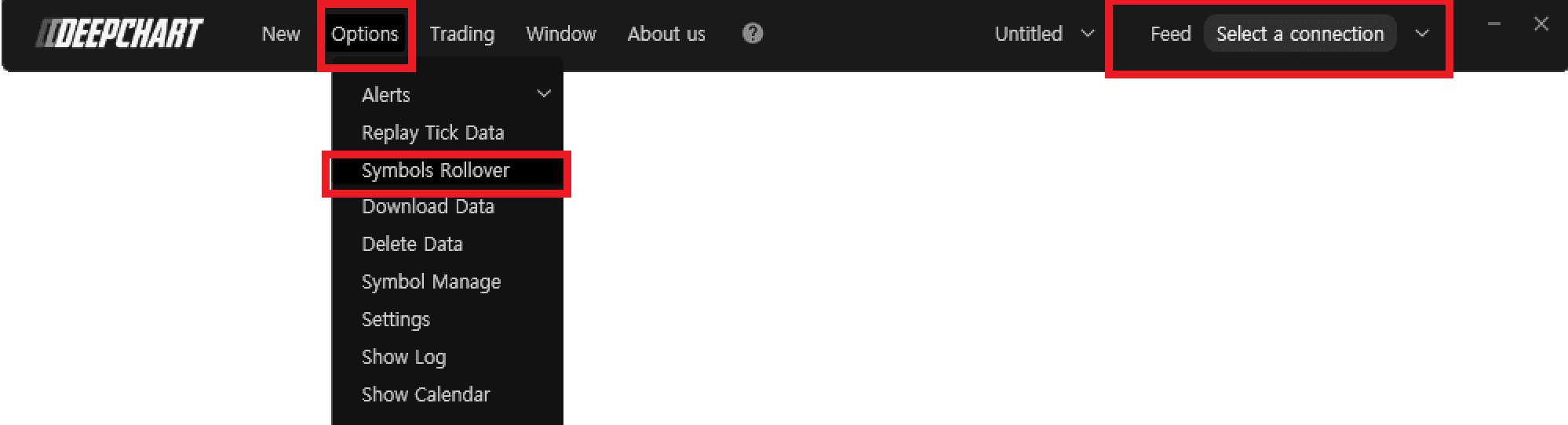
  1. Assurez-vous d’avoir fermé le graphique de prix et déconnecté le flux de données.

  2. Allez dans Options > Symbol Rollover

  3. Dans la fenêtre Manage Rollover, cliquez sur le symbole souhaité et appuyez sur Perform Rollover.

Tools for futures, currency & options involves substantial risk & is not appropriate for everyone. Only risk capital should be used for trading.

Testimonials appearing on this website may not be representative of other clients or customers and is not a guarantee of future performance or success.

Tools for futures, currency & options involves substantial risk & is not appropriate for everyone. Only risk capital should be used for trading. Testimonials appearing on this website may not be representative of other clients or customers and is not a guarantee of future performance or success.

Deepcharts © 2026 All right reserved

Tools for futures, currency & options involves substantial risk & is not appropriate for everyone. Only risk capital should be used for trading. Testimonials appearing on this website may not be representative of other clients or customers and is not a guarantee of future performance or success.

Deepcharts © 2026 All right reserved