Général

Updated:

Ouvrir un nouveau graphique des prix

Ouvrir un nouveau graphique des prix

Suivez ces étapes pour ouvrir une nouvelle fenêtre de graphique de prix depuis le menu principal.

Suivez ces étapes pour ouvrir une nouvelle fenêtre de graphique de prix depuis le menu principal.

No headings found on page
  1. Ouvrez le logiciel Deepchart

  2. Assurez-vous d’être connecté à Data Feed ou à Replay Tick Data

  3. Allez ici pour ouvrir un graphique : New > Price Chart


  4. Sélectionnez la bourse de votre choix

  5. Une nouvelle fenêtre de graphique de prix s’ouvrira et chargera vos données. 

  6. Attendez quelques secondes le temps que Deepchart génère vos données.

  7. Vous verrez un graphique de prix comme ceci :
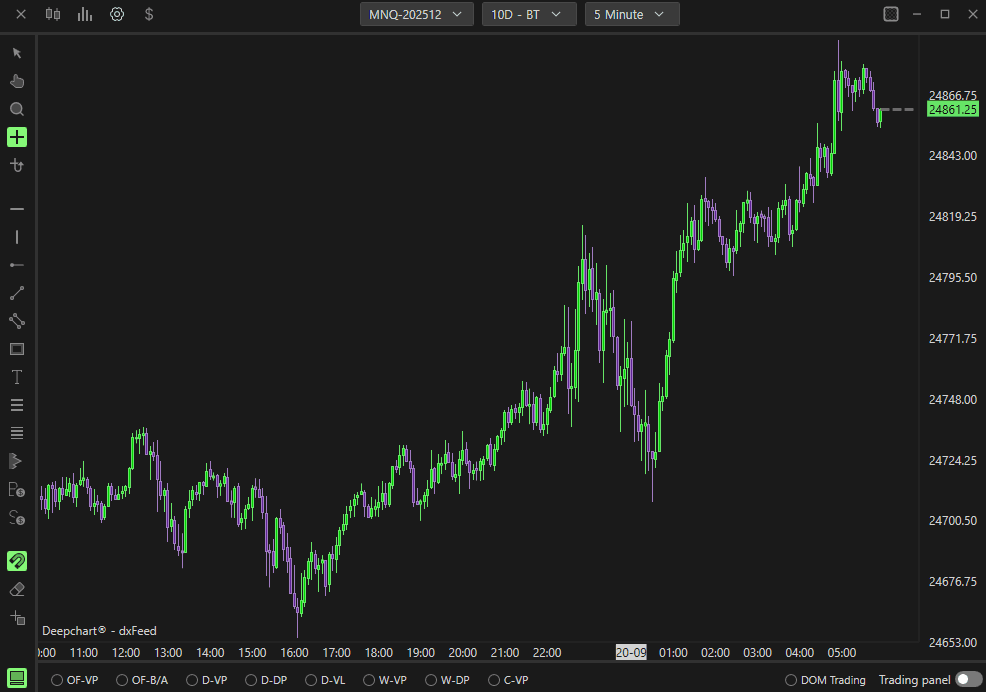
Table of Contents

No headings found on page

Tools for futures, currency & options involves substantial risk & is not appropriate for everyone. Only risk capital should be used for trading.

Testimonials appearing on this website may not be representative of other clients or customers and is not a guarantee of future performance or success.

Tools for futures, currency & options involves substantial risk & is not appropriate for everyone. Only risk capital should be used for trading. Testimonials appearing on this website may not be representative of other clients or customers and is not a guarantee of future performance or success.

Deepcharts © 2026 All right reserved

Tools for futures, currency & options involves substantial risk & is not appropriate for everyone. Only risk capital should be used for trading. Testimonials appearing on this website may not be representative of other clients or customers and is not a guarantee of future performance or success.

Deepcharts © 2026 All right reserved
