Updated:
What is the DeepCharts Competition?
The DeepCharts Competition is a skill-based trading tournament where participants trade on a simulated demo account and compete against other traders. Performance is tracked in real time on the competition leaderboard.
Important: You will need an active DeepCharts platform license and a live data feed (Rithmic or dxFeed) to participate. The 15-minute delayed feed is not supported for the competition as V-Sim executes positions in real time market conditions.

1. How to Join the Competition
Log in to your DeepCharts Dashboard at my.deepcharts.com
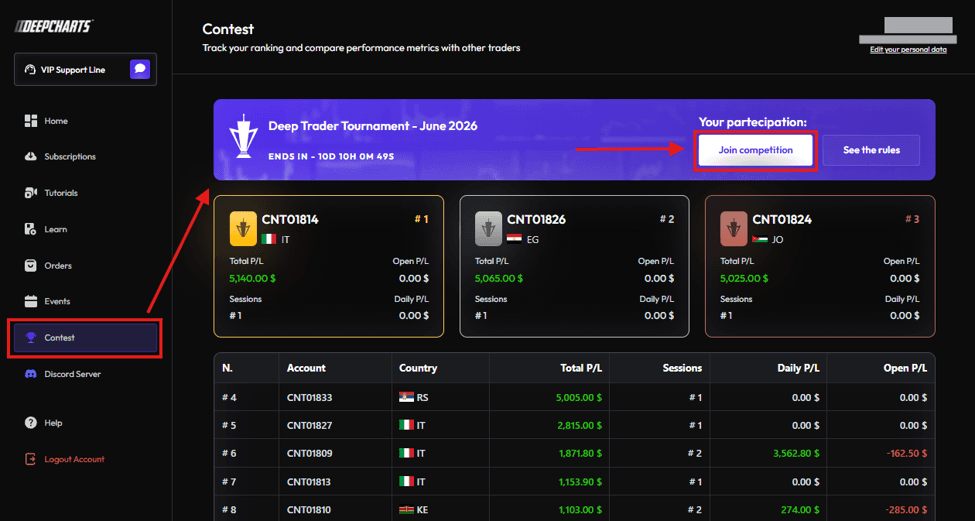
Click on Contest in the left sidebar
You will see the active competition — click Join Competition
A confirmation prompt will appear — click Join to confirm
Refresh the page after joining
2. Get Your Competition Credentials
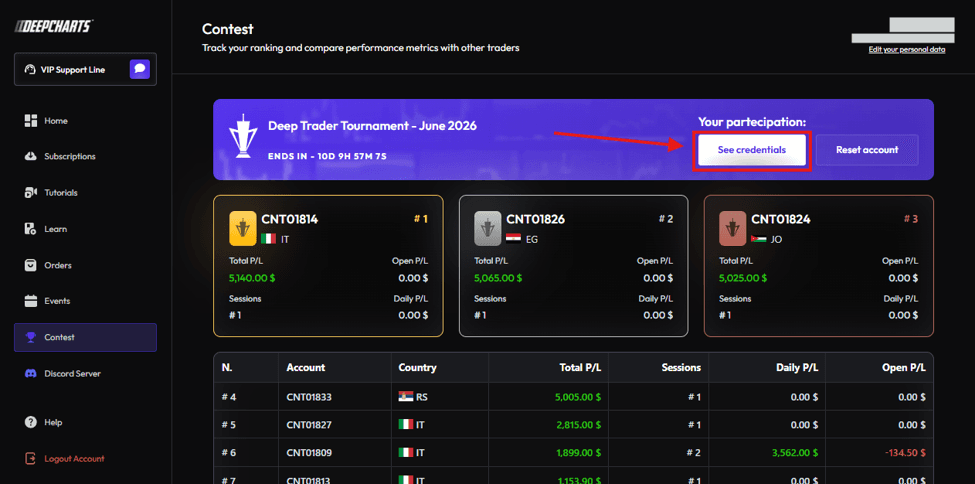
Once you have joined and refreshed the page, your participation status will update.
Click See Credentials
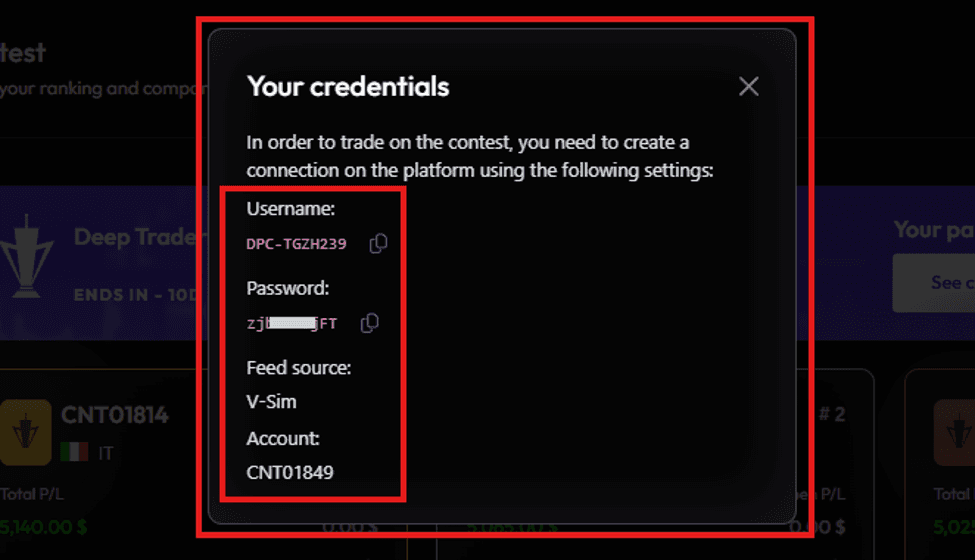
A popup will appear showing your competition account credentials:
Username
Password
Feed Source — V-Sim
Account — your competition account ID
Copy your Username and Password — you will need them in the next step
3. Connect Your Competition Account to DeepCharts
Open DeepCharts
Click on Select a Connection & Feed Settings
In the Feed Settings window, click Add Connection
Fill in the following details:
Name — Enter any name you prefer (e.g. "Competition")
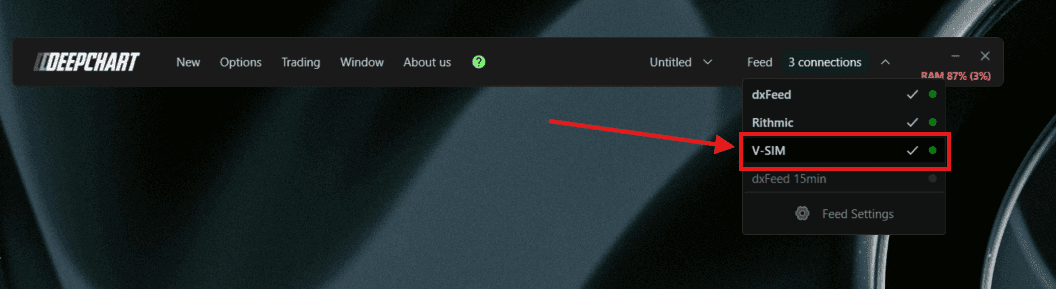
Feed Source — Select V-Sim (this is mandatory)
Username — Enter the username from your competition credentials
Password — Enter the password from your competition credentials
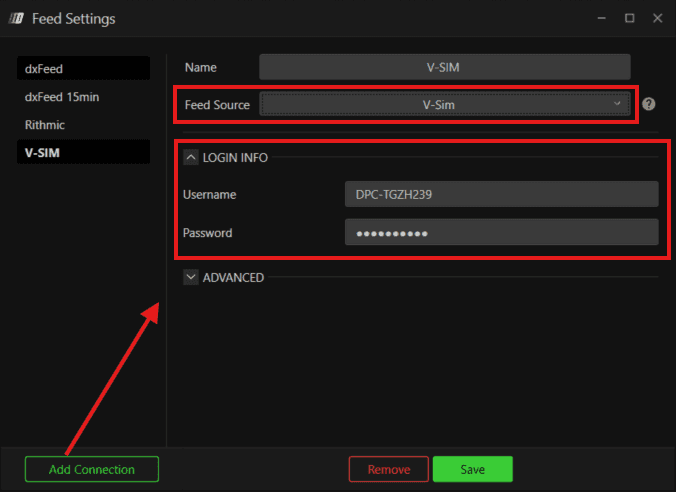
Click Save and close the Feed Settings window
Click on Select a Connection, find your newly created profile and connect to it
Make sure the circle turns green — this confirms a successful connection
4. Start Trading the Competition
Once connected, open a Price Chart in DeepCharts.
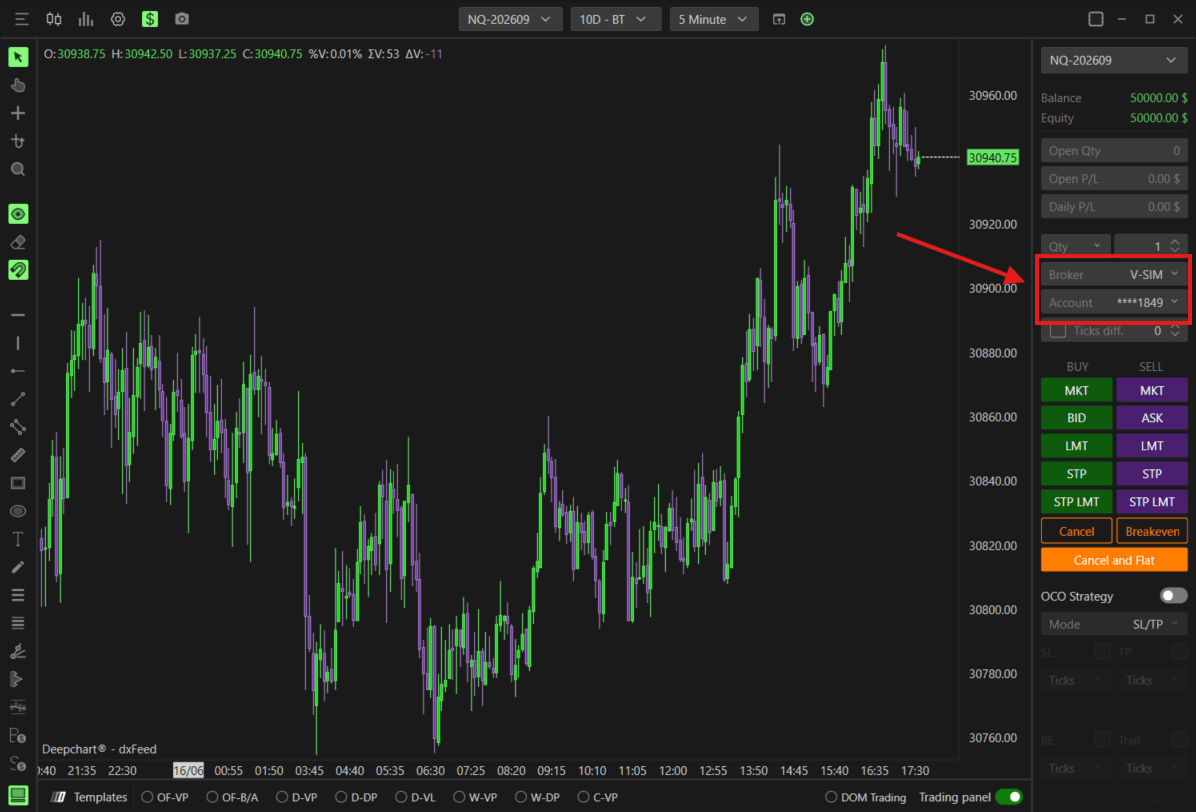
In the Trading Panel on the right side, locate the Broker field
Select V-Sim as the broker
Select your competition account from the Account dropdown
You are now ready to trade — your balance will show $50,000 as the starting balance
Note: Your live data feed (Rithmic or dxFeed) must remain connected at all times to view real time market data. V-Sim is only used to execute trades on your competition account — it does not provide market data.
5. Reset Your Account
If you want to reset your competition account back to $50,000, you can do so from the Contest page.
Go to Contest in your DeepCharts Dashboard
Click Reset Account
A confirmation prompt will appear — confirm to reset

Note: You are only allowed one reset and it must be done within the first week of the competition. Once reset, your account balance will return to $50,000 and you will remain eligible to win.
Competition Rules
General
The competition is conducted on simulated demo accounts only and does not involve real money
Performance is determined solely by skill-based metrics
Participants must have an active DeepCharts platform license and live data feed subscription throughout the entire competition
Account & Trading Rules
Starting balance — $50,000
Minimum 3 active trading days required to qualify for ranking
Maximum daily loss cap — 3% of account balance. All trades will be closed and trading disabled for the remaining session if the cap is reached
Maximum daily profit cap — 10% of account balance. All trades will be closed and trading disabled for the remaining session if the cap is reached
Maximum allowed position size — 5 mini contracts at any time
Overnight positions are strictly prohibited — all positions will be automatically closed at market close
Only 1 account reset permitted within the first week of the contest
Prizes
🥇 1st Place — Trophy, 12 months DeepCharts access, Merch package
🥈 2nd Place — Trophy, 6 months DeepCharts access, Merch package
🥉 3rd Place — Trophy, 3 months DeepCharts access, Merch package
4th to 10th Place — 1 month DeepCharts access
Note - The organizer reserves the right to interpret, enforce, and amend these rules to ensure fairness, integrity, and compliance with UAE regulations. Participation implies full acceptance of these rules.
Still Having Trouble?
Our support team is available 24/7 and ready to help you with any issue you encounter.
When reaching out, please include:
A screenshot of the issue
A brief description of what you were trying to do
Support Ticket (Fastest Response)
Visit www.deepcharts.com and create a support ticket directly on our website.
Email Support
Reach us at support@deepcharts.com — please note that email responses may take a little longer than a support ticket.
