How To

Updated:

Feb 22, 2026

Symbol Rollover (Change Contract Month Code)

Symbol Rollover (Change Contract Month Code)

No headings found on page

Here will show how to do symbol rollover (updating contract month code)

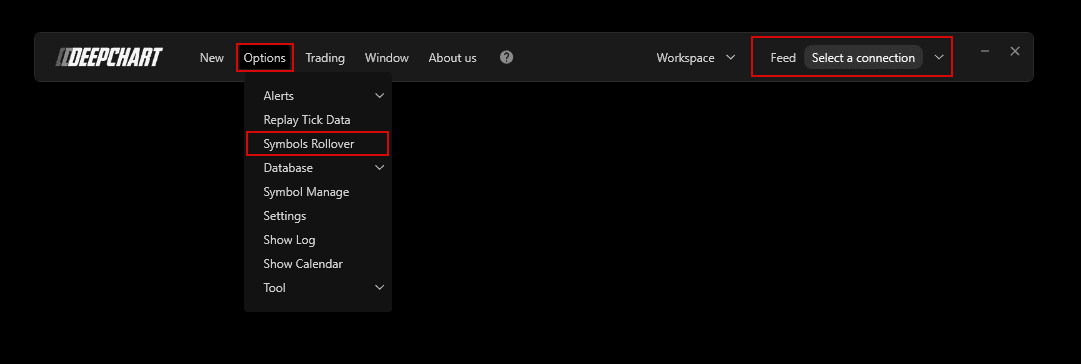
  1. Make sure you have closed the price chart and disconnected from data feed.

  2. Go to Options > Symbol Rollover

  3. In Manage Rollover window, click on the desired Symbol and press Perform Rollover.

Tools for futures, currency & options involves substantial risk & is not appropriate for everyone. Only risk capital should be used for trading.

Testimonials appearing on this website may not be representative of other clients or customers and is not a guarantee of future performance or success.

Tools for futures, currency & options involves substantial risk & is not appropriate for everyone. Only risk capital should be used for trading. Testimonials appearing on this website may not be representative of other clients or customers and is not a guarantee of future performance or success.

Deepcharts © 2026 All right reserved

Tools for futures, currency & options involves substantial risk & is not appropriate for everyone. Only risk capital should be used for trading. Testimonials appearing on this website may not be representative of other clients or customers and is not a guarantee of future performance or success.

Deepcharts © 2026 All right reserved