Option Delta displays the net delta from options trading activity on a subgraph below your chart. It helps you understand the directional pressure coming from the options market, whether call or put activity is dominating, and can be used to estimate the hedging pressure that market makers may be applying to the futures market.

Note: Option Delta uses CBOE data and shows values on SPX charts only.

How to Add Option Delta
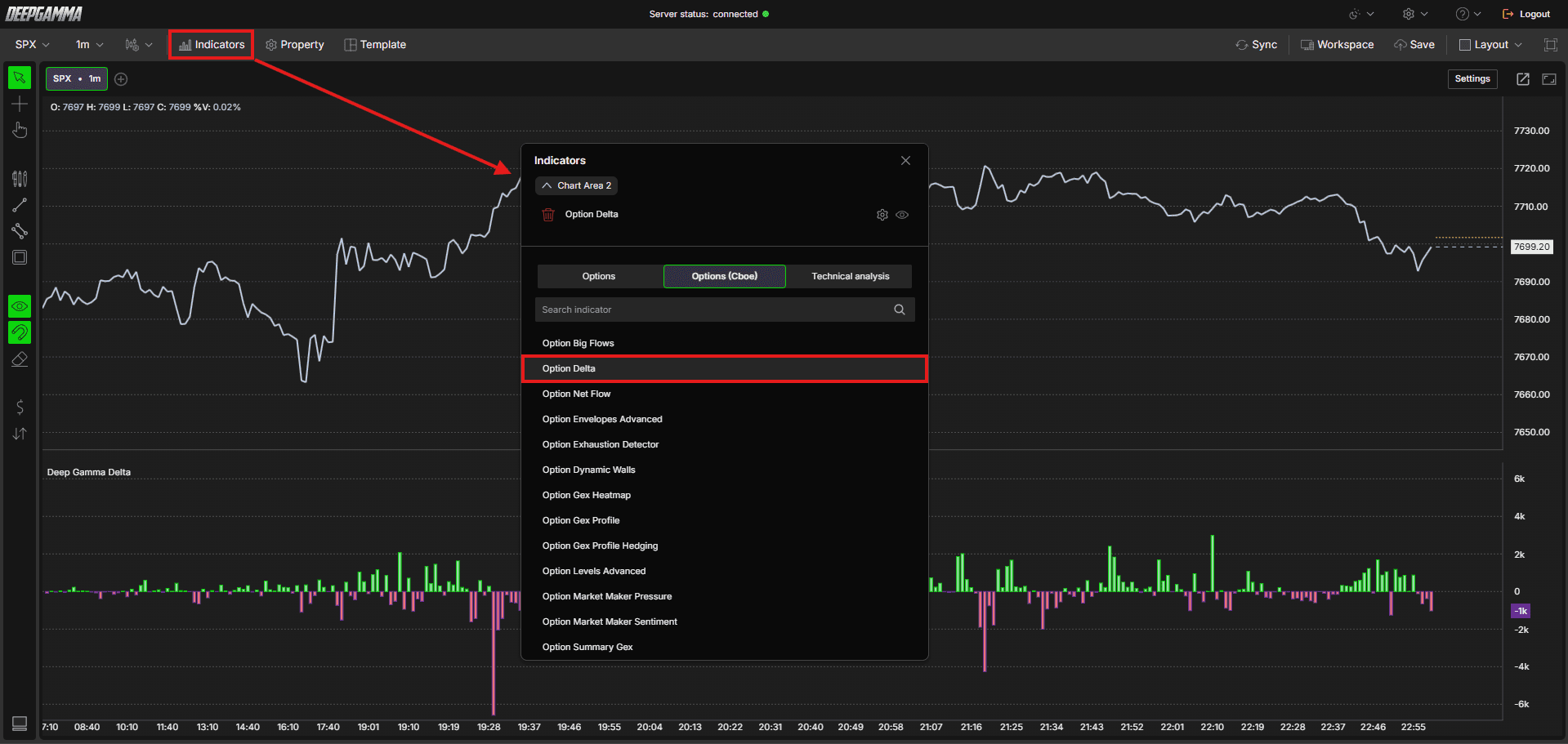
Open an SPX chart in DeepGamma Web
Click Indicators in the Menu Bar
Click the green Add indicator button at the bottom of the panel
Open the Options (Cboe) tab and search for Option Delta
The indicator is added to your chart and appears in the Indicators panel
Click the gear icon next to Option Delta to open its settings
Understanding Key Terms
Before adjusting the settings, it helps to understand a few core options concepts:
Call - An option that gives the buyer the right to buy the underlying at a set price. Traders buy calls when they expect price to go up
Put - An option that gives the buyer the right to sell the underlying at a set price. Traders buy puts when they expect price to go down
Delta - A measure of how much an option’s price is expected to move relative to a one point move in the underlying. In this context, delta is used to represent the directional exposure created by options trading activity
Gamma - A measure of how much an option’s delta changes as price moves. High gamma means dealers need to adjust their hedges more aggressively as price moves
Premium - The total dollar value paid for the option contract, calculated as the contract price multiplied by volume
MM (Market Maker) - The participants who take the other side of customer trades and hedge their exposure in the underlying market
DTE (Days to Expiration) - The number of days remaining before the option contract expires. A DTE of 0 means the option expires the same day
Settings
The settings window has two tabs: Parameters and Series. After making changes, click Apply to update the chart.
Parameters
General
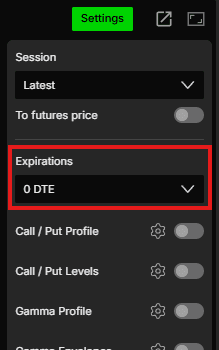
Expiration - Filter delta by expiration. Options available: Default, 0 DTE, <= 1d, <= 2d, <= 3d, <= 4d, <= 5d, <= 6d, <= 7d, <= 31d, <= 91d, All expirations
Note: When Expiration is set to Default, it uses the expiration selected under Expirations in the Settings quick bar.
Value - Choose how the delta is measured. Options available:
Net contracts (default) - Displays the net number of option contracts traded.
Use this when : you want a simple count of directional exposure, regardless of priceNet premium - Displays the net premium value in USD.
Use this when : you want to weigh delta by dollar value, since a small number of expensive contracts can matter more than a large number of cheap onesNet contracts x delta - Multiplies the net contracts by the delta greek, showing the directional exposure created by the flow.
Use this when : you want to see how much directional weight the options activity actually carries, not just how many contracts tradedNet contracts x gamma - Multiplies the net contracts by the gamma greek, showing how much the flow can change delta exposure as price moves.
Use this when : you want to see where options activity may lead to faster hedging adjustmentsNet contracts MM - Displays the net contracts from the market maker side, based on CBOE market maker data.
Use this when : you want to see how market makers are positioned rather than customersNet premium MM - Displays the net premium in USD from the market maker side.
Use this when : you want to weigh market maker positioning by dollar valueNet MM x delta - Multiplies the net market maker contracts by the delta greek. This works like a real time CVD, showing the potential hedging impact if each trade were immediately hedged on the underlying.
Use this when : you want to estimate the futures flow that market maker hedging may createNet MM x gamma - Multiplies the net market maker contracts by the gamma greek.
Use this when : you want to see how quickly market maker hedging needs may change as price moves
Option Type - Choose which side of the market to display. Options available:
Cumulative difference (default) - Displays the net value combining both call and put activity (call minus put).
Use this when : you want a single net read on overall options market direction, rather than looking at calls and puts separatelyCall - Displays values from call options only.
Use this when : you want to isolate call side activity specifically, without put side flow affecting the picturePut - Displays values from put options only.
Use this when : you want to isolate put side activity specifically, without call side flow affecting the pictureCumulative sum - Adds call and put values together instead of subtracting them. Use this with the x delta values, since delta already carries opposite signs for calls and puts, so the values need to be summed rather than subtracted
Revert - By default, Option Delta shows the delta from the customer’s perspective. When Revert is enabled, the delta values are inverted to show the estimated market maker’s perspective, since market makers are typically on the opposite side of every trade. Default is disabled
Disabled - Shows delta from the customer’s side.
Use this when : you want to see what the overall market is doing, whether participants are buying calls or puts and in which direction the flow is leaningEnabled - Inverts the delta to estimate market maker exposure. Since market makers hedge their exposure, a large positive delta on the customer side means the market maker is likely short delta and will need to buy futures to hedge.
Use this when : you want to understand the hedging pressure market makers may be applying to the futures market
Cumulative - By default, Option Delta plots bar by bar values showing the delta for each individual candle. When Cumulative is enabled, the delta is plotted as a running total across the session, similar to CVD but for options delta. Default is disabled
Disabled - Shows the delta value for each individual bar.
Use this when : you want to see real time bar by bar options activity and spot sudden spikes in delta that may coincide with key price movesEnabled - Shows a running cumulative total across the session. A steadily rising cumulative delta suggests sustained call buying pressure, while a falling cumulative delta suggests sustained put buying pressure.
Use this when : you want to see whether options delta is consistently building in one direction over time
Using Revert and Cumulative Together
Both disabled - Gives you a clean bar by bar view of customer delta.
Use this when : you want to spot immediate spikes in options activity as they happenBoth enabled - Gives you a cumulative running total of estimated market maker delta.
Use this when : you want to track whether market makers are building hedging pressure in one direction throughout the session, which can give you an early indication of potential futures flow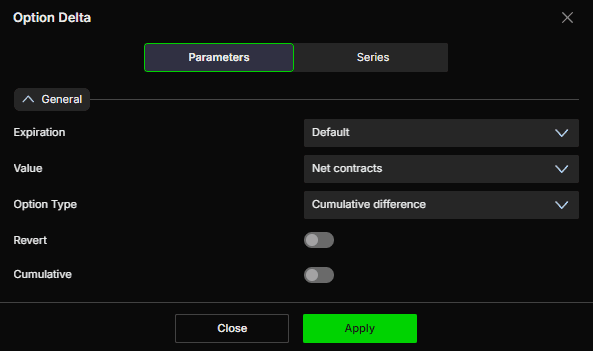
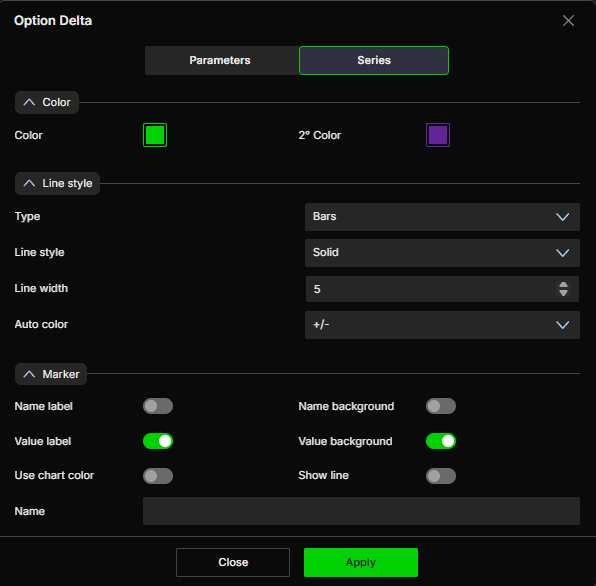
Series
Color
Color - Set the primary color. Default is green
2° Color - Set the secondary color. Default is purple
Line style
Type - Choose how the series is drawn. Default is Bars
Line style - Choose between Solid or Dash. Default is Solid
Line width - Set the thickness of the bars or line. Default is 5
Auto color - Options available: None, Slope, +/-. Default is +/-
Marker
Name label - Show or hide the series name label. Default is disabled
Name background - Show or hide the background behind the name label. Default is disabled
Value label - Show or hide the value label. Default is enabled
Value background - Show or hide the background behind the value label. Default is enabled
Use chart color - When enabled, the marker uses the chart color. Default is disabled
Show line - When enabled, the current value is extended as a line to the right edge of the chart. Default is disabled
Name - Set a custom label for this series
Example - How to Use Option Delta
Option Delta helps you understand the directional pressure coming from the options market and estimate the hedging activity of market makers. Here are some practical ways to use it:
Reading the Bars
Positive bars = More call side delta, bullish pressure
Negative bars = More put side delta, bearish pressure
The taller the bar, the stronger the directional pressure
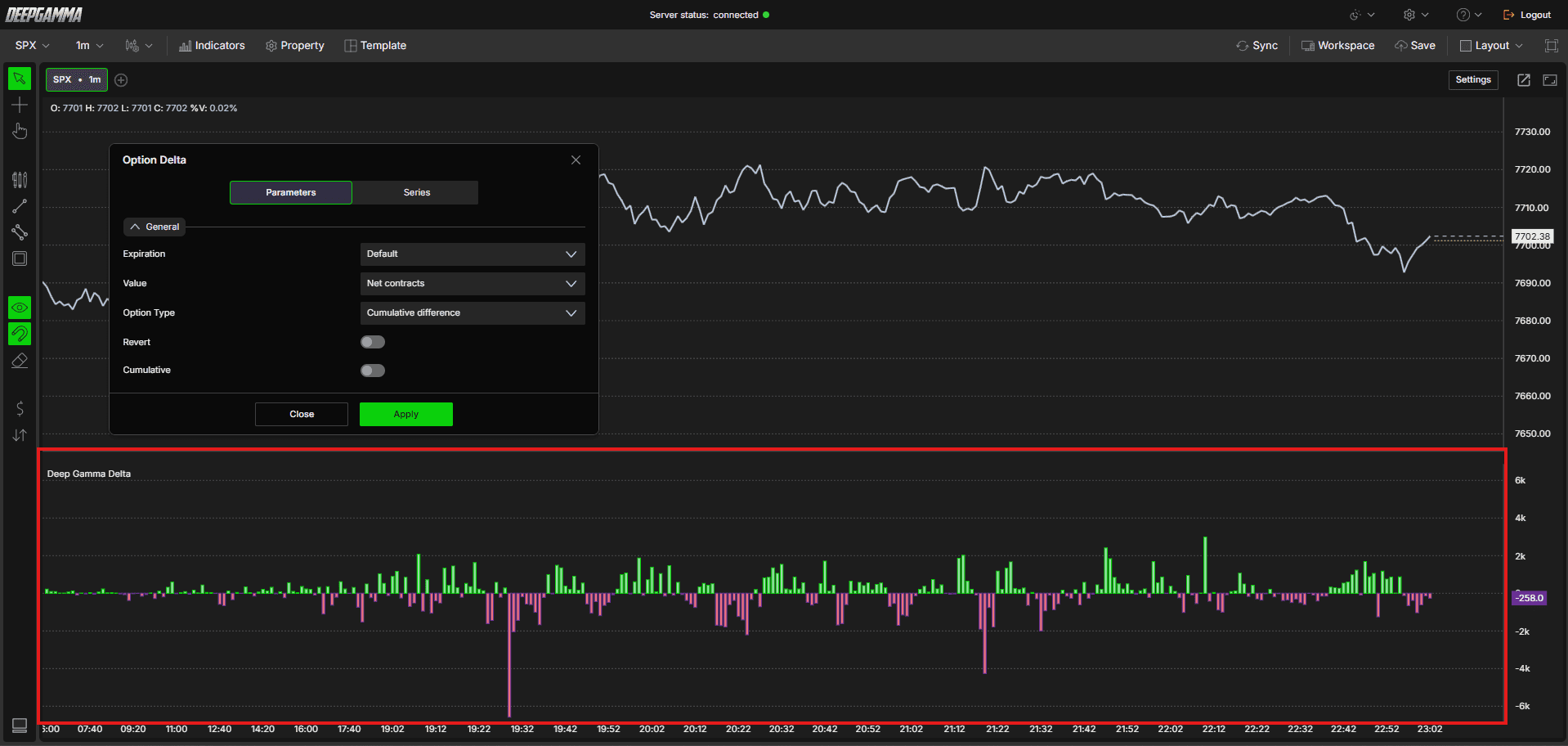
Using Default View (Revert off, Cumulative off)
Read bar by bar to spot immediate spikes in options delta
A sudden positive spike suggests aggressive call buying at that moment
A sudden negative spike suggests aggressive put buying at that moment
Using Cumulative (Revert off, Cumulative on)
Works like a CVD but for options delta
A steadily rising cumulative line suggests sustained bullish options pressure building throughout the session
A steadily falling cumulative line suggests sustained bearish options pressure
Use this to confirm whether the options market is consistently leaning in one direction

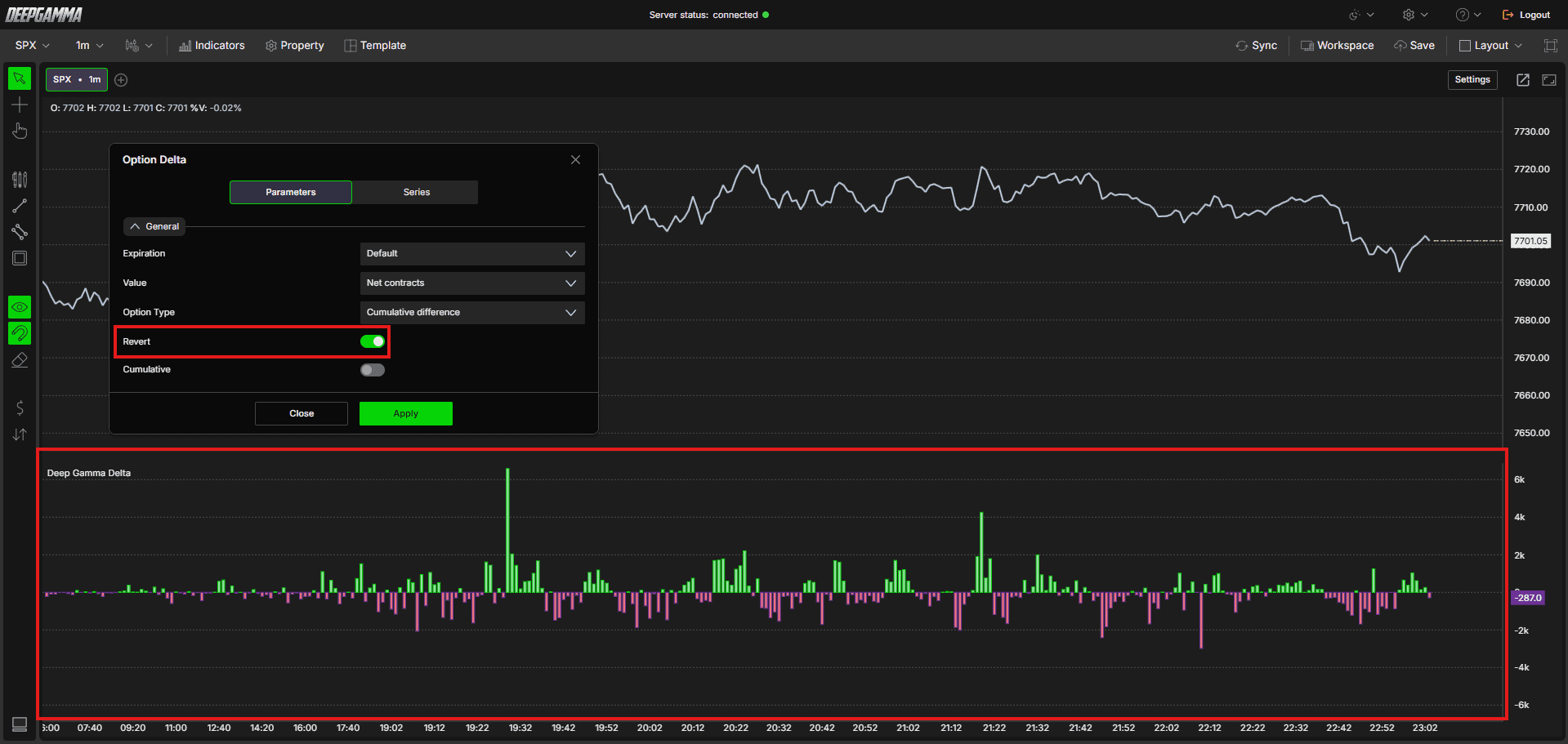
Using Revert (Revert on, Cumulative off)
Flips the delta to show estimated market maker perspective
Since market makers are on the opposite side of most trades, this shows you the estimated hedging pressure they are applying to the futures market
Use this to anticipate potential futures flow from dealer hedging
Using Both Together (Revert on, Cumulative on)
The most powerful combination
Shows you the cumulative estimated market maker delta throughout the session
Helps you track whether market makers are consistently building hedging pressure in one direction, which can give you an early indication of potential futures flow

Note: Option Delta works best in confluence with your GEX levels, heatmap and footprint. Never use it as a standalone signal.
Any Questions?
Our support team is available 24/7 and ready to help you with any question.
When reaching out, please include:
Screenshot (if any)
Briefly describe the assistance or support you require
DeepCharts Live Support - Chat with our agents directly using the live chat box on www.deepcharts.com, or click here for 24/7 Live Chat for immediate access.
Email Support - Reach us at support@deepcharts.com - please note that email responses may take a little longer than a live support chat.
