Option Envelopes plots three key gamma levels directly on your price chart as horizontal lines: Zero Gamma, Major Gamma, and Minor Gamma. These levels help you see where dealer hedging activity is likely to be most concentrated. That gives you a structural framework for spotting potential support, resistance, and regime changes in the market.

Note: Option Envelopes is available on NDX, QQQ, SPY, and SPX.

How to Add Option Envelopes
Open an NDX, QQQ, SPX or SPY chart in DeepGamma Web
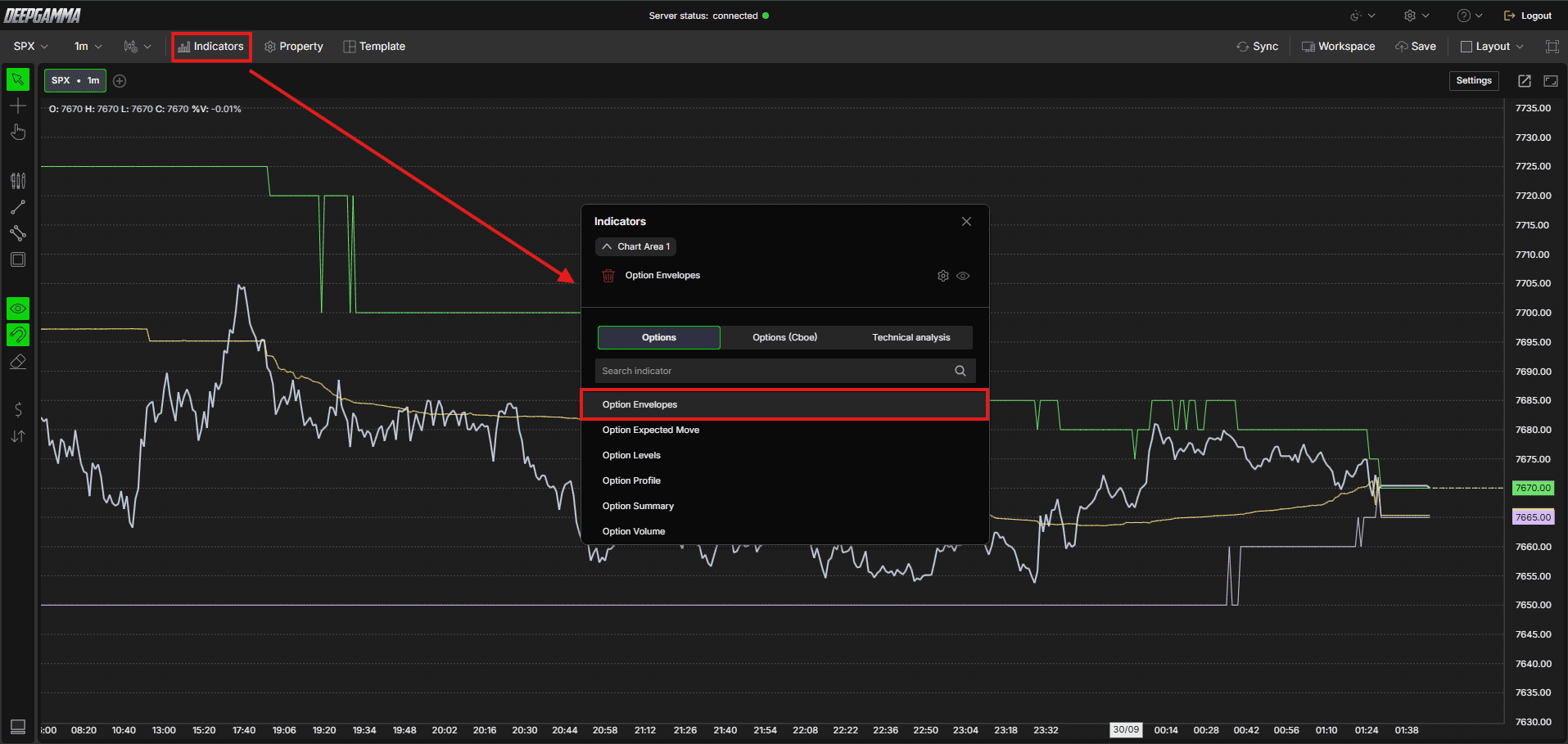
Click Indicators in the Menu Bar
Click the green Add indicator button at the bottom of the panel
Open the Options tab and search for Option Envelopes
The indicator is added to your chart and appears in the Indicators panel
Click the gear icon next to Option Envelopes to open its settings
Understanding Key Terms
Before choosing a data source, it helps to understand a few core options concepts:
Call - An option that gives the buyer the right to buy the underlying at a set price. Traders buy calls when they expect price to go up
Put - An option that gives the buyer the right to sell the underlying at a set price. Traders buy puts when they expect price to go down
OI (Open Interest) - The total number of option contracts currently open and not yet closed or expired
Gamma volume - Options volume multiplied by the gamma greek at each strike. This gives a more accurate picture of actual dealer exposure than raw volume alone
Call put - Raw call and put options volume at each strike, with no gamma weighting
Open interest eod - Open interest data from the previous session’s end of day close, rather than live intraday activity
Settings
The settings window has two tabs: Parameters and Series. After making changes, click Apply to update the chart.
Parameters
General
Data Source - Choose how the gamma levels are calculated. Options available:
Gamma (call - put) (default) - Calculates levels based on volume multiplied by the gamma greek, giving you a more accurate picture of actual dealer exposure.
Use this when : you want a gamma-weighted read on dealer positioning and market regimeCall ∑ - put ∑ - Calculates levels based on the difference between raw call and put options volume. This shows where the most contracts are concentrated, regardless of gamma weighting.
Use this when : you want a simple read on where the most contracts are tradingCall / put ∑ - Calculates levels based on the ratio of call to put options volume rather than the difference, showing relative call versus put activity at each strike.
Use this when : you want to see the balance between call and put volume rather than the net differenceCall / put OI (eod) - Calculates levels using the prior session’s end of day open interest. This shows structural levels based on standing positions rather than the current session’s live trading activity.
Use this when : you want a structural view based on standing positions from the previous session’s closeGamma (call OI-E - put OI-E) - Calculates levels based on the difference between call and put end of day open interest, multiplied by the gamma greek. This gives a gamma-weighted read on standing positions rather than live volume.
Use this when : you want a gamma-weighted view of dealer exposure based on standing open interest instead of current session trading activity
Expiration - Filter levels by expiration. Options available: Default, 0 DTE, <= 1d, <= 7d, <= 31d, <= 91d, All expirations
Note: When Expiration is set to Default, it uses the expiration selected under Expirations in the Settings quick bar.

Include Carry or Open interest - When enabled, includes open interest carried over from previous sessions in the calculation, giving you a broader view of total positioning. When disabled, only current session data is considered. Default is enabled
Number of Strikes (0 - unlimited) - Sets how many strikes out from the current price to include in the calculation. A value of 0 includes an unlimited number of strikes. Default is 0

Series
Select a series on the left (Zero Gamma, Major Gamma or Minor Gamma) to set up how it looks on the chart.
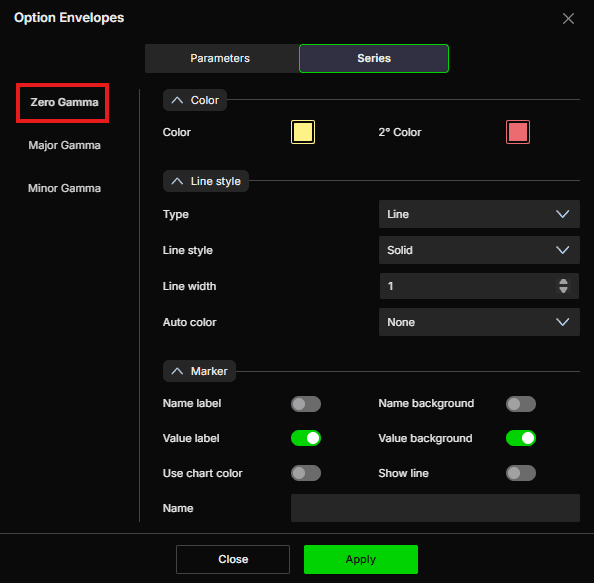
Zero Gamma
Zero Gamma is the most important level. It is the price point where dealer gamma exposure flips from positive to negative. Above this level, dealers are long gamma and tend to dampen price moves. Below it, dealers are short gamma and tend to amplify price moves.
Color
Color - Set the main color of the line. Default is yellow
2° Color - Set a secondary color. Default is red
Line style
Type - Choose between Line or Hidden. Default is Line
Line style - Choose between Solid or Dash. Default is Solid
Line width - Set the thickness of the line. Default is 1
Auto color - Options available: None, Slope, +/-. Default is None
Marker
Name label - Show or hide the series name label. Default is disabled
Name background - Show or hide the background behind the name label. Default is disabled
Value label - Show or hide the value label. Default is enabled
Value background - Show or hide the background behind the value label. Default is enabled
Use chart color - When enabled, the marker uses the chart color. Default is disabled
Show line - When enabled, the current level is extended as a line to the right edge of the chart, so you can see where the level sits ahead of price. Default is disabled
Name - Set a custom label for this series
Major Gamma
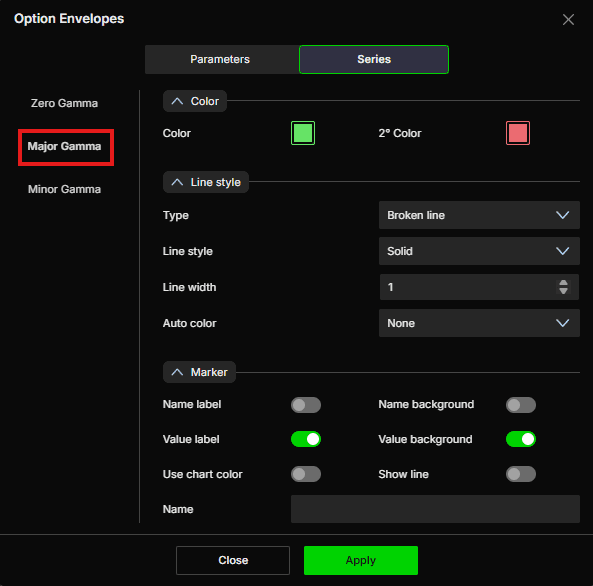
Major Gamma is the highest concentration of dealer gamma exposure. This is where the most significant support or resistance from dealer hedging is likely to appear.
Color
Color - Set the main color of the line. Default is green
2° Color - Set a secondary color. Default is red
Line style
Type - Choose between Line, Hidden, or Broken line. Default is Broken line
Line style - Choose between Solid or Dash. Default is Solid
Line width - Set the thickness of the line. Default is 1
Auto color - Options available: None, Slope, +/-. Default is None
Marker
Name label - Show or hide the series name label. Default is disabled
Name background - Show or hide the background behind the name label. Default is disabled
Value label - Show or hide the value label. Default is enabled
Value background - Show or hide the background behind the value label. Default is enabled
Use chart color - When enabled, the marker uses the chart color. Default is disabled
Show line - When enabled, the current level is extended as a line to the right edge of the chart, so you can see where the level sits ahead of price. Default is disabled
Name - Set a custom label for this series
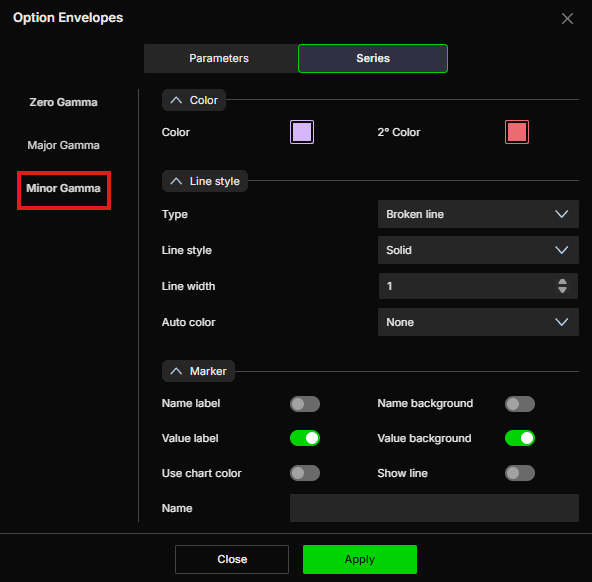
Minor Gamma
Minor Gamma is the secondary concentration of dealer gamma exposure. It acts as a softer level than Major Gamma and is useful for identifying intermediate reaction zones.
Color
Color - Set the main color of the line. Default is purple
2° Color - Set a secondary color. Default is red
Line style
Type - Choose between Line, Hidden, or Broken line. Default is Broken line
Line style - Choose between Solid or Dash. Default is Solid
Line width - Set the thickness of the line. Default is 1
Auto color - Options available: None, Slope, +/-. Default is None
Marker
Name label - Show or hide the series name label. Default is disabled
Name background - Show or hide the background behind the name label. Default is disabled
Value label - Show or hide the value label. Default is enabled
Value background - Show or hide the background behind the value label. Default is enabled
Use chart color - When enabled, the marker uses the chart color. Default is disabled
Show line - When enabled, the current level is extended as a line to the right edge of the chart, so you can see where the level sits ahead of price. Default is disabled
Name - Set a custom label for this series
Example - How to Use Option Envelopes
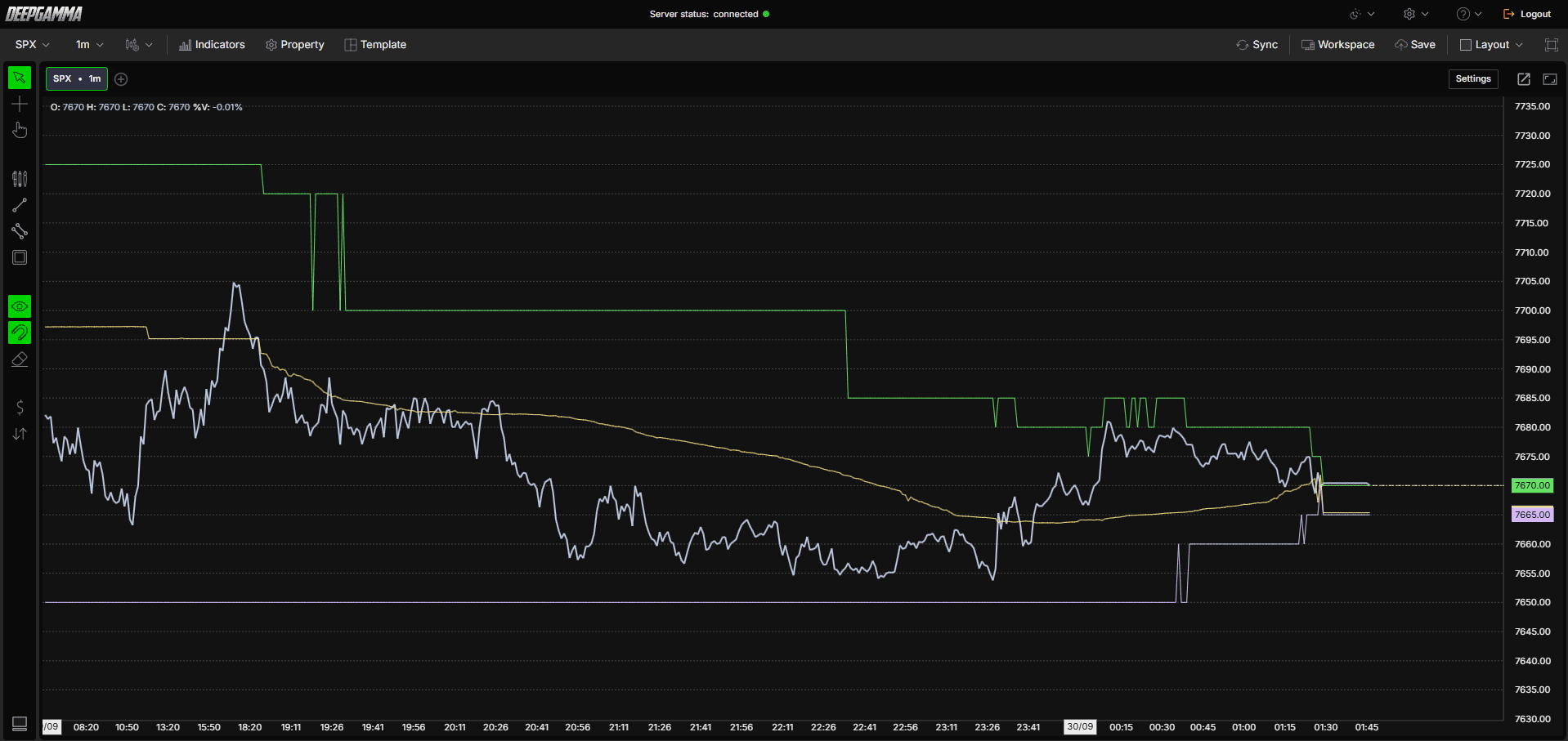
Once added to your chart, you will see three types of lines plotted directly on your price chart:
The yellow line is the Zero Gamma level, the most important level on the chart. Think of it as the dividing line between two market regimes. When price is above it, dealers tend to be long gamma and the market tends to be calmer, with moves more likely to fade. When price breaks below it, dealers tend to be short gamma and the market can become more volatile, with moves extending further
The green lines are the Major Gamma levels, zones where dealer gamma exposure is most concentrated. How price reacts here depends on the direction it approaches from and the current gamma regime. It may slow down, reverse, or accelerate through the level rather than reacting the same way every time
The purple line is the Minor Gamma level, a softer secondary reference zone. It carries the same kind of significance as Major Gamma, just to a lesser degree, and is useful for identifying intermediate reaction points

A simple way to use this indicator is to note where price is relative to the Zero Gamma level at the start of your session. If price is above it, expect a more compressed market where breakouts may fail. If price is below it, expect more directional moves and be cautious about fading strong moves.
Any Questions?
Our support team is available 24/7 and ready to help you with any question.
When reaching out, please include:
Screenshot (if any)
Briefly describe the assistance or support you require
DeepCharts Live Support - Chat with our agents directly using the live chat box on www.deepcharts.com, or click here for 24/7 Live Chat for immediate access.
Email Support - Reach us at support@deepcharts.com - please note that email responses may take a little longer than a live support chat.
