Updated:
In DeepCharts, puoi salvare i layout e le configurazioni dei tuoi grafici usando Modelli e Spazi di lavoro.
Questa funzione ti aiuta a evitare di riconfigurare i tuoi grafici ogni volta che avvii la piattaforma
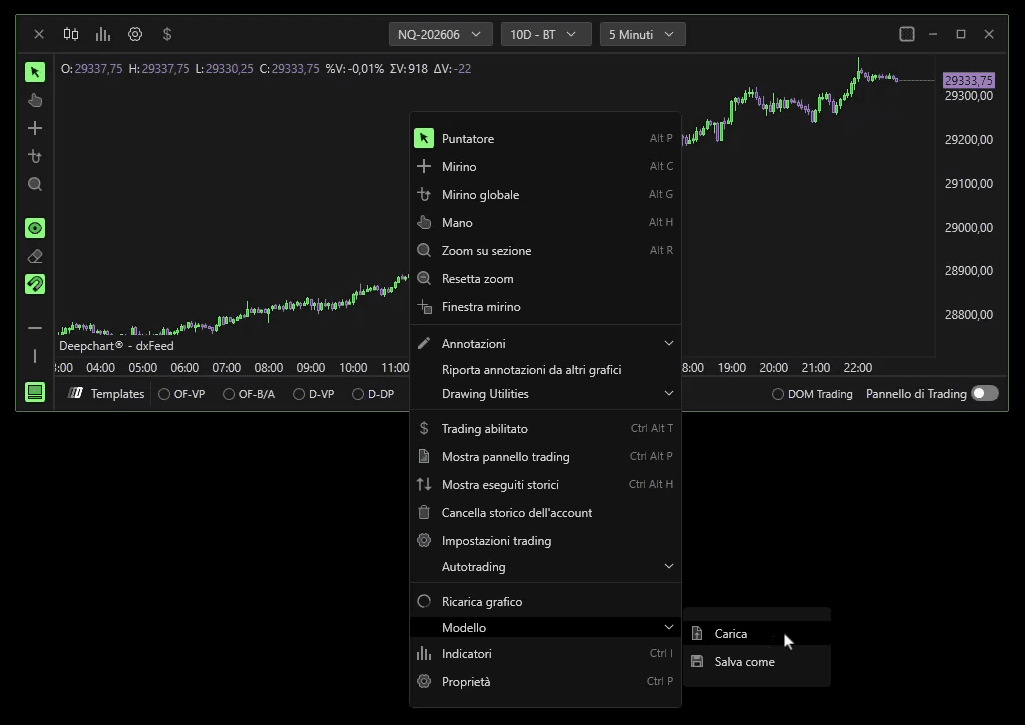
I Modelli salvano la configurazione attuale del grafico — inclusi indicatori, stili e impostazioni.
Puoi salvare o caricare i modelli facendo clic con il tasto destro in un punto qualsiasi del grafico e selezionando le opzioni Carica o Salva modello.
Gli Spazi di lavoro salvano il layout completo, inclusi più grafici, indicatori e profili. Puoi salvare e caricare gli spazi di lavoro dal pannello di gestione degli spazi di lavoro.
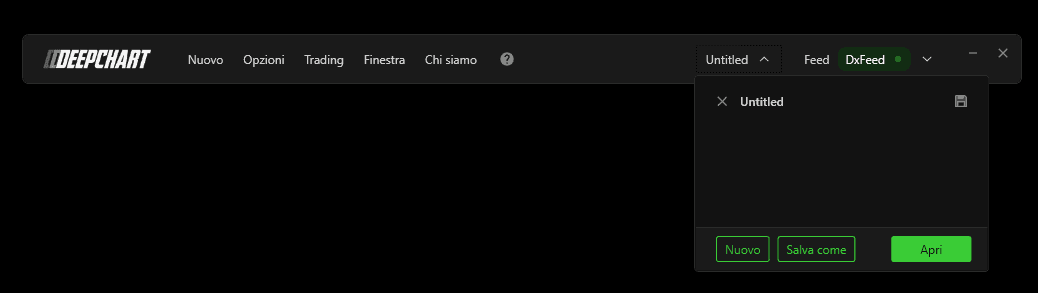
Sia i modelli sia gli spazi di lavoro possono essere salvati localmente o nel cloud, consentendoti di ripristinare facilmente le configurazioni preferite in qualsiasi momento.
