Come fare
Updated:
Accedi alle impostazioni generali
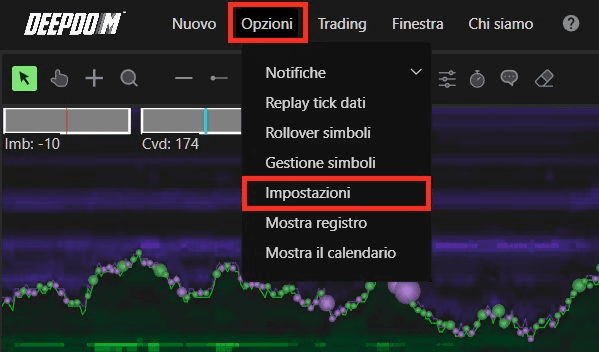
1. Apri Opzioni nella barra dei menu di DeepDom.
2. Fai clic su Impostazioni.
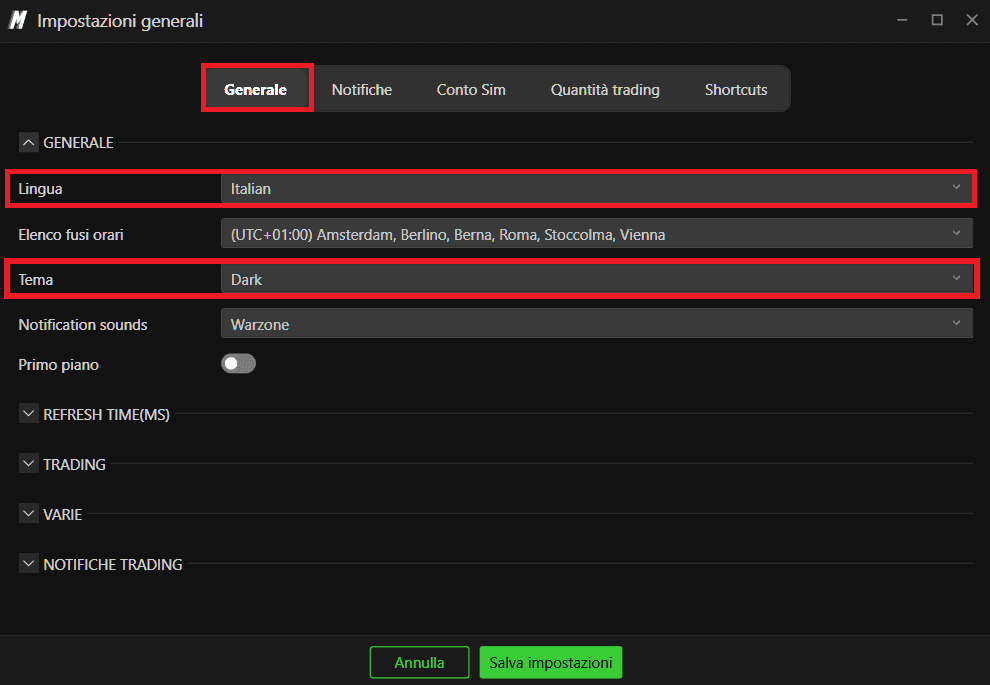
3. Nella colonna di sinistra, seleziona la sezione Generale. Qui puoi configurare:
Lingua
Fuso orario
Tema (aspetto della piattaforma)

Modifica la lingua dell'interfaccia
Dal menu a tendina Lingua, scegli la lingua che preferisci. Le opzioni disponibili in genere includono:
Inglese
Italiano
Spagnolo
Tedesco
Cinese
Dopo aver selezionato una nuova lingua, riavvia DeepDom se richiesto, in modo che tutti i menu e i messaggi vengano aggiornati completamente.
Seleziona un tema della piattaforma
Per modificare l'aspetto visivo della piattaforma, scegli un tema dall'elenco Tema (aspetto della piattaforma). Su VolSys/DeepDom sono disponibili i seguenti temi:
Scuro
Verde scuro
Azzurro scuro
Blu
Chiaro
Viola
Hai ancora problemi?
Il nostro team di supporto è disponibile 24/7 ed è pronto ad aiutarti con qualsiasi problema tu riscontri. Quando ci contatti, includi:
Uno screenshot del problema.
Una breve descrizione di ciò che stavi cercando di fare.
Ticket di supporto (risposta più rapida): visita www.deepcharts.com e crea direttamente un ticket di supporto sul nostro sito web.
Supporto via email: puoi anche contattarci all'indirizzo support@deepcharts.com. Tieni presente che le risposte via email potrebbero richiedere un po' più di tempo rispetto a un ticket di supporto.
