Option Envelopes traccia tre livelli gamma chiave direttamente sul tuo grafico dei prezzi come linee orizzontali: Zero Gamma, Major Gamma e Minor Gamma. Questi livelli ti aiutano a vedere dove è probabile che si concentri l'attività di copertura dei dealer. Ottieni così una struttura di riferimento per individuare possibili supporti, resistenze e cambi di regime del mercato.

Nota: Option Envelopes è disponibile su NDX, QQQ, SPY e SPX.

Come aggiungere Option Envelopes
Apri un grafico NDX, QQQ, SPX o SPY in DeepGamma Web
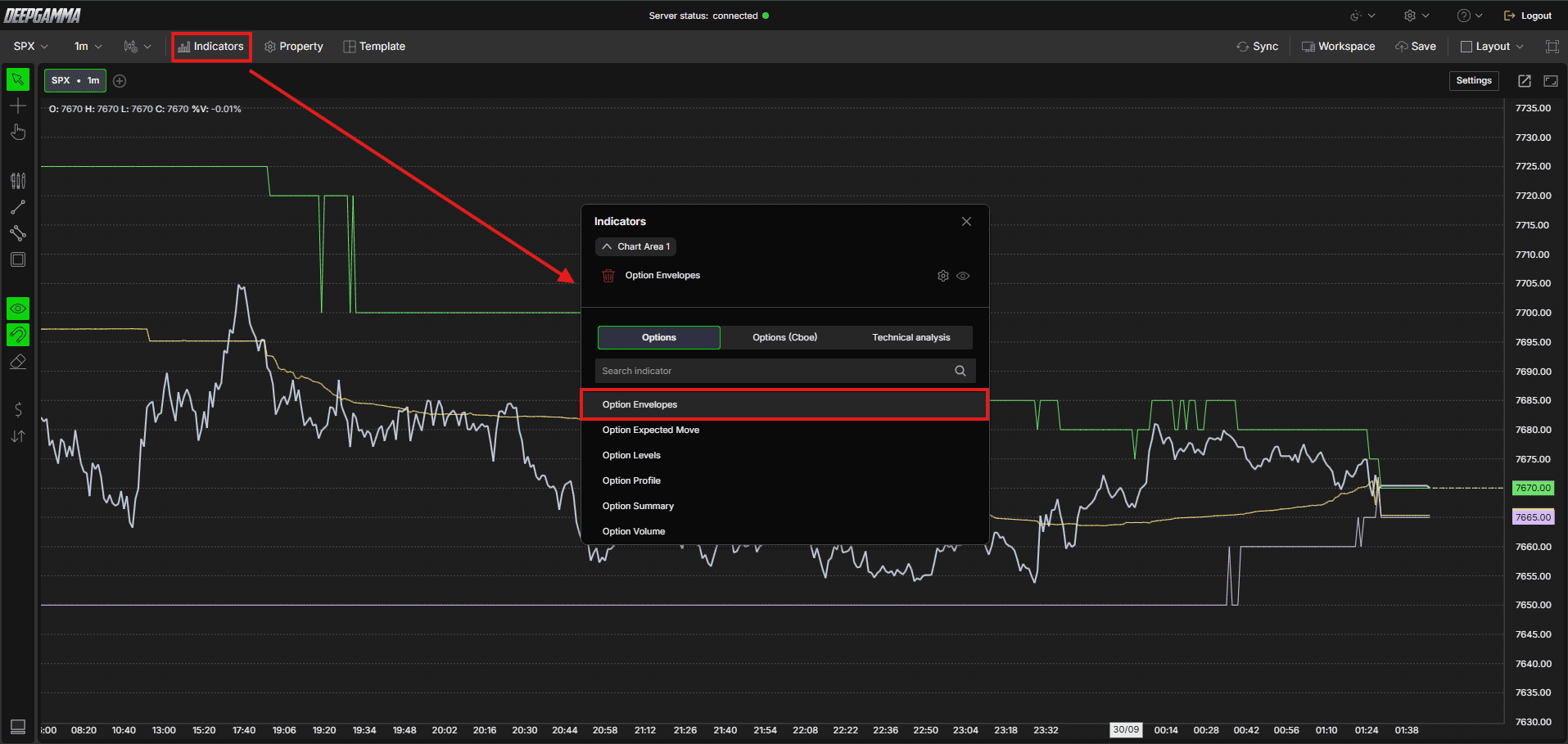
Fai clic su Indicators nella Menu Bar
Fai clic sul pulsante verde Add indicator in fondo al pannello
Apri la scheda Options e cerca Option Envelopes
L'indicatore viene aggiunto al grafico e compare nel pannello Indicators
Fai clic sull'icona a ingranaggio accanto a Option Envelopes per aprirne le impostazioni
I concetti chiave
Prima di scegliere una fonte dati, è utile conoscere alcuni concetti base sulle opzioni:
Call - Un'opzione che dà all'acquirente il diritto di comprare il sottostante a un prezzo prestabilito. I trader comprano call quando si aspettano un rialzo del prezzo
Put - Un'opzione che dà all'acquirente il diritto di vendere il sottostante a un prezzo prestabilito. I trader comprano put quando si aspettano un ribasso del prezzo
OI (Open Interest) - Il numero totale di contratti di opzioni attualmente aperti, non ancora chiusi né scaduti
Gamma volume - Il volume delle opzioni moltiplicato per la greca gamma di ogni strike. Offre un quadro dell'esposizione effettiva dei dealer più preciso del solo volume grezzo
Call put - Il volume grezzo di call e put a ogni strike, senza ponderazione gamma
Open interest eod - I dati di open interest della chiusura della sessione precedente (end of day), invece dell'attività intraday in tempo reale
Impostazioni
La finestra delle impostazioni ha due schede: Parameters e Series. Dopo aver apportato le modifiche, fai clic su Apply per aggiornare il grafico.
Parametri
General
Data Source - Scegli come vengono calcolati i livelli gamma. Opzioni disponibili:
Gamma (call - put) (predefinito) - Calcola i livelli in base al volume moltiplicato per la greca gamma, offrendoti un quadro più preciso dell'esposizione effettiva dei dealer.
Usalo quando: vuoi una lettura ponderata per il gamma del posizionamento dei dealer e del regime di mercatoCall ∑ - put ∑ - Calcola i livelli in base alla differenza tra il volume grezzo di call e put. Mostra dove si concentra il maggior numero di contratti, indipendentemente dalla ponderazione gamma.
Usalo quando: vuoi una lettura semplice di dove viene scambiato il maggior numero di contrattiCall / put ∑ - Calcola i livelli in base al rapporto tra volume di call e di put invece che alla differenza, mostrando l'attività relativa di call rispetto alle put a ogni strike.
Usalo quando: vuoi vedere l'equilibrio tra volume di call e di put invece della differenza nettaCall / put OI (eod) - Calcola i livelli usando l'open interest di fine giornata della sessione precedente. Mostra livelli strutturali basati sulle posizioni aperte invece che sull'attività di trading live della sessione corrente.
Usalo quando: vuoi una vista strutturale basata sulle posizioni aperte alla chiusura della sessione precedenteGamma (call OI-E - put OI-E) - Calcola i livelli in base alla differenza tra l'open interest di fine giornata di call e put, moltiplicata per la greca gamma. Offre una lettura ponderata per il gamma delle posizioni aperte invece del volume live.
Usalo quando: vuoi una vista dell'esposizione dei dealer ponderata per il gamma, basata sull'open interest in essere invece che sull'attività della sessione corrente
Expiration - Filtra i livelli per scadenza. Opzioni disponibili: Default, 0 DTE, <= 1d, <= 7d, <= 31d, <= 91d, All expirations
Nota: quando Expiration è impostato su Default, viene usata la scadenza selezionata in Expirations nella barra rapida Settings.

Include Carry or Open interest - Se attivo, include nel calcolo l'open interest riportato dalle sessioni precedenti, offrendoti una visione più ampia del posizionamento totale. Se disattivato, considera solo i dati della sessione corrente. Attivo per impostazione predefinita
Number of Strikes (0 - unlimited) - Imposta quanti strike, a partire dal prezzo corrente, includere nel calcolo. Con il valore 0 il numero di strike è illimitato. Il valore predefinito è 0

Series
Seleziona una serie a sinistra (Zero Gamma, Major Gamma o Minor Gamma) per impostarne l'aspetto sul grafico.
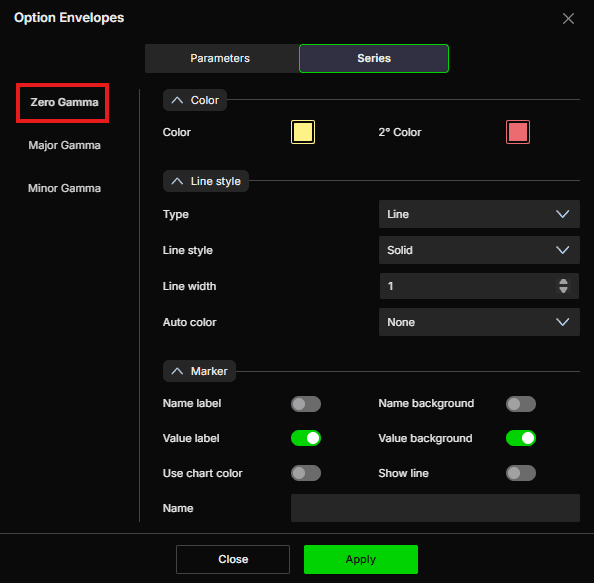
Zero Gamma
Lo Zero Gamma è il livello più importante. È il punto di prezzo in cui l'esposizione gamma dei dealer passa da positiva a negativa. Sopra questo livello i dealer sono long gamma e tendono ad attenuare i movimenti di prezzo. Sotto questo livello i dealer sono short gamma e tendono ad amplificarli.
Color
Color - Imposta il colore principale della linea. Il valore predefinito è giallo
2° Color - Imposta un colore secondario. Il valore predefinito è rosso
Line style
Type - Scegli tra Line o Hidden. Il valore predefinito è Line
Line style - Scegli tra Solid o Dash. Il valore predefinito è Solid
Line width - Imposta lo spessore della linea. Il valore predefinito è 1
Auto color - Opzioni disponibili: None, Slope, +/-. Il valore predefinito è None
Marker
Name label - Mostra o nasconde l'etichetta del nome della serie. Disattivato per impostazione predefinita
Name background - Mostra o nasconde lo sfondo dietro l'etichetta del nome. Disattivato per impostazione predefinita
Value label - Mostra o nasconde l'etichetta del valore. Attivo per impostazione predefinita
Value background - Mostra o nasconde lo sfondo dietro l'etichetta del valore. Attivo per impostazione predefinita
Use chart color - Se attivo, il marker usa il colore del grafico. Disattivato per impostazione predefinita
Show line - Se attivo, il livello corrente viene esteso come linea fino al bordo destro del grafico, così vedi dove si trova il livello davanti al prezzo. Disattivato per impostazione predefinita
Name - Imposta un'etichetta personalizzata per questa serie
Major Gamma
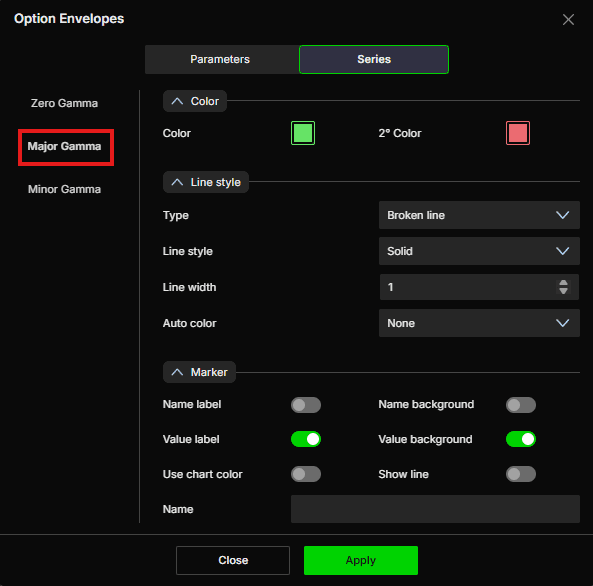
Il Major Gamma è la concentrazione più alta di esposizione gamma dei dealer. È qui che è più probabile trovare il supporto o la resistenza più significativi dovuti alla copertura dei dealer.
Color
Color - Imposta il colore principale della linea. Il valore predefinito è verde
2° Color - Imposta un colore secondario. Il valore predefinito è rosso
Line style
Type - Scegli tra Line, Hidden o Broken line. Il valore predefinito è Broken line
Line style - Scegli tra Solid o Dash. Il valore predefinito è Solid
Line width - Imposta lo spessore della linea. Il valore predefinito è 1
Auto color - Opzioni disponibili: None, Slope, +/-. Il valore predefinito è None
Marker
Name label - Mostra o nasconde l'etichetta del nome della serie. Disattivato per impostazione predefinita
Name background - Mostra o nasconde lo sfondo dietro l'etichetta del nome. Disattivato per impostazione predefinita
Value label - Mostra o nasconde l'etichetta del valore. Attivo per impostazione predefinita
Value background - Mostra o nasconde lo sfondo dietro l'etichetta del valore. Attivo per impostazione predefinita
Use chart color - Se attivo, il marker usa il colore del grafico. Disattivato per impostazione predefinita
Show line - Se attivo, il livello corrente viene esteso come linea fino al bordo destro del grafico, così vedi dove si trova il livello davanti al prezzo. Disattivato per impostazione predefinita
Name - Imposta un'etichetta personalizzata per questa serie
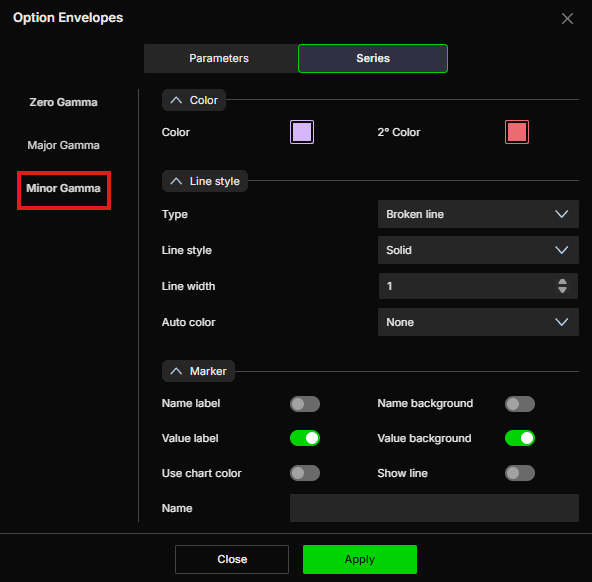
Minor Gamma
Il Minor Gamma è la concentrazione secondaria di esposizione gamma dei dealer. È un livello meno forte rispetto al Major Gamma ed è utile per individuare zone di reazione intermedie.
Color
Color - Imposta il colore principale della linea. Il valore predefinito è viola
2° Color - Imposta un colore secondario. Il valore predefinito è rosso
Line style
Type - Scegli tra Line, Hidden o Broken line. Il valore predefinito è Broken line
Line style - Scegli tra Solid o Dash. Il valore predefinito è Solid
Line width - Imposta lo spessore della linea. Il valore predefinito è 1
Auto color - Opzioni disponibili: None, Slope, +/-. Il valore predefinito è None
Marker
Name label - Mostra o nasconde l'etichetta del nome della serie. Disattivato per impostazione predefinita
Name background - Mostra o nasconde lo sfondo dietro l'etichetta del nome. Disattivato per impostazione predefinita
Value label - Mostra o nasconde l'etichetta del valore. Attivo per impostazione predefinita
Value background - Mostra o nasconde lo sfondo dietro l'etichetta del valore. Attivo per impostazione predefinita
Use chart color - Se attivo, il marker usa il colore del grafico. Disattivato per impostazione predefinita
Show line - Se attivo, il livello corrente viene esteso come linea fino al bordo destro del grafico, così vedi dove si trova il livello davanti al prezzo. Disattivato per impostazione predefinita
Name - Imposta un'etichetta personalizzata per questa serie
Esempio - Come usare Option Envelopes
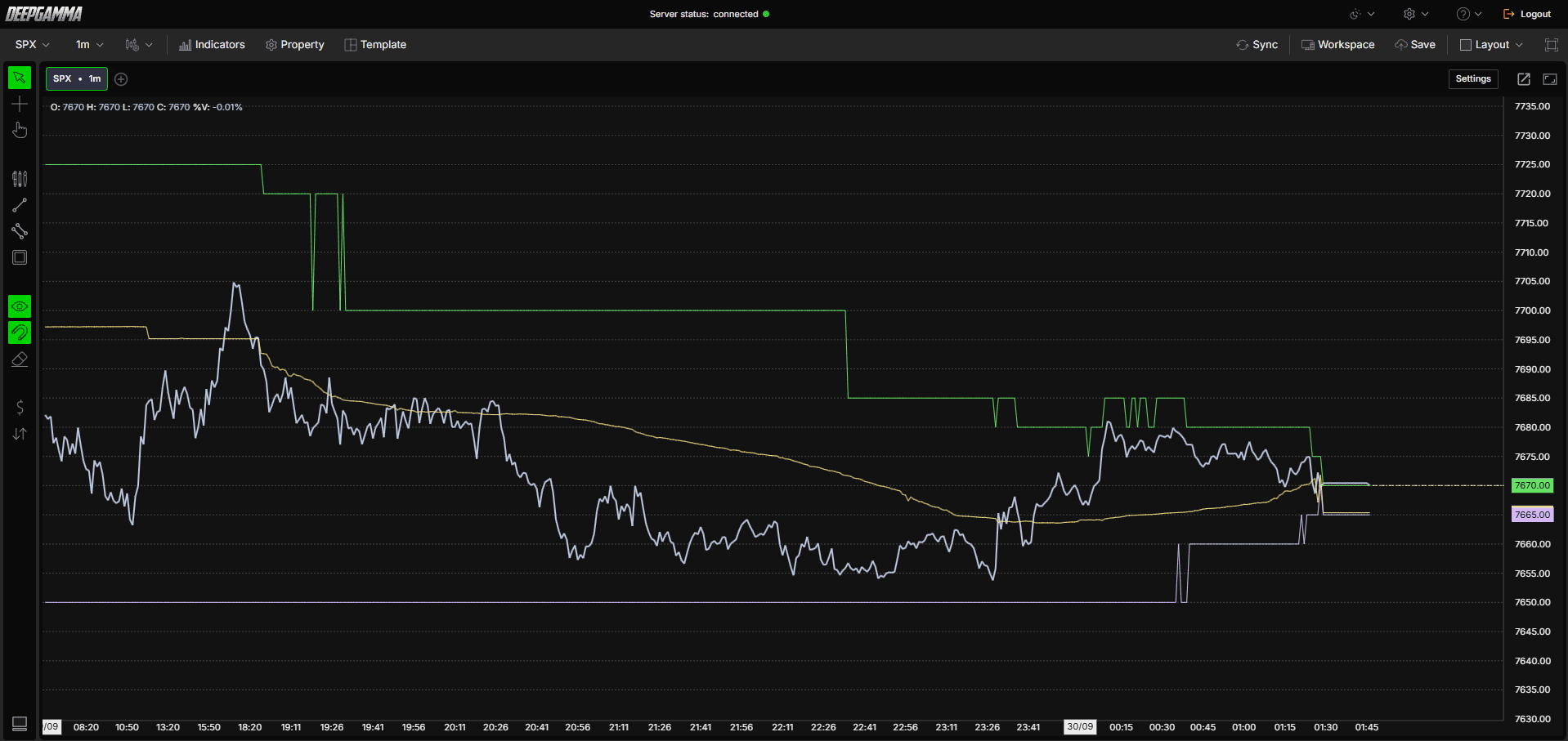
Una volta aggiunto al grafico, vedrai tre tipi di linee tracciate direttamente sul tuo grafico dei prezzi:
La linea gialla è il livello Zero Gamma, il più importante del grafico. Consideralo come la linea di separazione tra due regimi di mercato. Quando il prezzo si trova sopra, i dealer tendono a essere long gamma e il mercato tende a essere più calmo, con movimenti che più facilmente rientrano. Quando il prezzo rompe al di sotto, i dealer tendono a essere short gamma e il mercato può diventare più volatile, con movimenti che si estendono di più
Le linee verdi sono i livelli Major Gamma, zone in cui l'esposizione gamma dei dealer è più concentrata. La reazione del prezzo dipende dalla direzione da cui arriva e dal regime gamma in corso. Può rallentare, invertire o accelerare attraverso il livello, senza reagire ogni volta allo stesso modo
La linea viola è il livello Minor Gamma, una zona di riferimento secondaria e più debole. Ha lo stesso tipo di significato del Major Gamma, ma in misura minore, ed è utile per individuare punti di reazione intermedi

Un modo semplice per usare questo indicatore è osservare dove si trova il prezzo rispetto allo Zero Gamma all'inizio della sessione. Se il prezzo è sopra, aspettati un mercato più compresso in cui i breakout possono fallire. Se il prezzo è sotto, aspettati movimenti più direzionali e fai attenzione a fare fading dei movimenti forti.
Hai domande?
Il nostro team di supporto è disponibile 24/7 e pronto ad aiutarti con qualsiasi domanda.
Quando ci contatti, includi:
Screenshot (se disponibili)
Una breve descrizione dell'assistenza o del supporto di cui hai bisogno
Supporto live DeepCharts - Chatta direttamente con i nostri operatori tramite la live chat su www.deepcharts.com, oppure clicca qui per la Live Chat 24/7 per un accesso immediato.
Supporto via email - Scrivici a support@deepcharts.com - tieni presente che le risposte via email possono richiedere un po' più di tempo rispetto alla live chat.
