Cómo hacer

Updated:

Rollover del símbolo (cambiar el código del mes del contrato)

Rollover del símbolo (cambiar el código del mes del contrato)

No headings found on page

Aquí se muestra cómo hacer el rollover de símbolo (actualizar el código del mes del contrato)

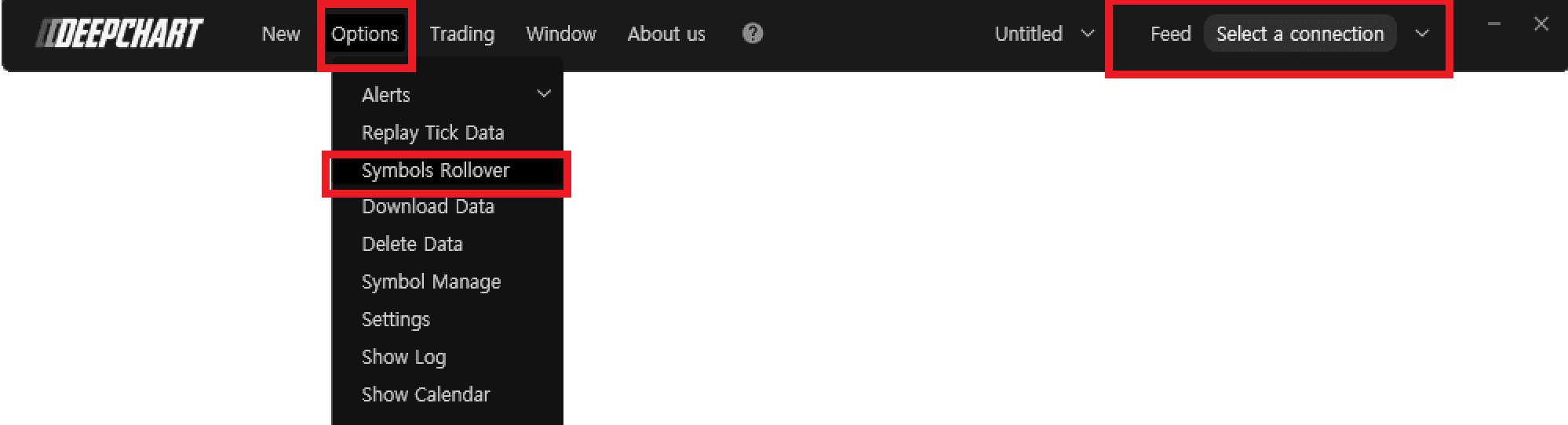
  1. Asegúrate de haber cerrado el gráfico de precios y desconectado del flujo de datos.

  2. Ve a Opciones > Rollover de símbolo

  3. En la ventana Administrar rollover, haz clic en el símbolo deseado y pulsa Realizar rollover.

Tools for futures, currency & options involves substantial risk & is not appropriate for everyone. Only risk capital should be used for trading.

Testimonials appearing on this website may not be representative of other clients or customers and is not a guarantee of future performance or success.

Tools for futures, currency & options involves substantial risk & is not appropriate for everyone. Only risk capital should be used for trading. Testimonials appearing on this website may not be representative of other clients or customers and is not a guarantee of future performance or success.

Deepcharts © 2026 All right reserved

Tools for futures, currency & options involves substantial risk & is not appropriate for everyone. Only risk capital should be used for trading. Testimonials appearing on this website may not be representative of other clients or customers and is not a guarantee of future performance or success.

Deepcharts © 2026 All right reserved