Updated:
Overview
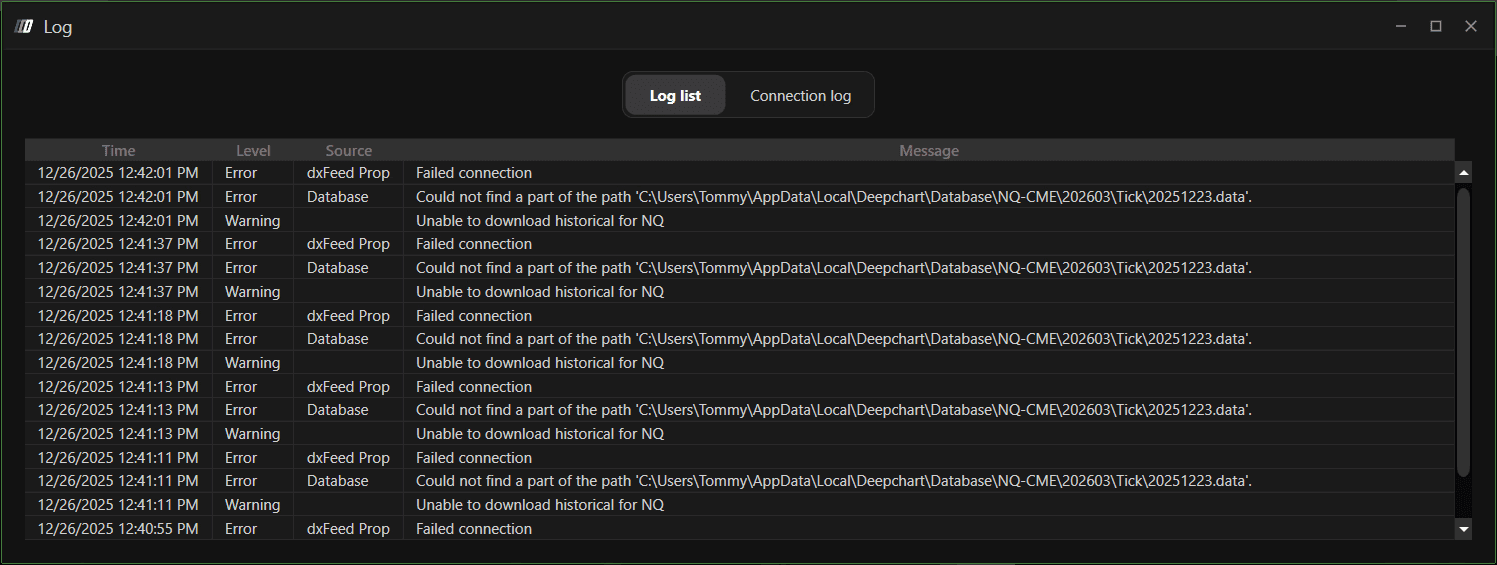
This error appears when DeepChart cannot locate required data folders inside the local database directory. It typically occurs after the database or symbol folders are deleted manually while the platform is still running.

Cause
Data folders inside the DeepChart database directory were deleted manually
DeepChart is still referencing paths that no longer exist
Required folders were not recreated because the platform was not restarted
This is a local file system issue, not a data feed or server error.
Solution: Restart DeepChart
Steps
Close DeepChart completely
Make sure DeepChart is no longer running in the background
Reopen DeepChart
Load the affected chart again
When DeepChart starts, it will automatically recreate the missing folder structure and download fresh data.
✅ The error should now be resolved.
Important Notes
Always restart DeepChart after deleting any database or symbol folders
Do not delete data folders while charts are actively loading
DeepChart automatically regenerates required directories on startup
Prevention Tips
Close DeepChart before making any manual changes to database folders
Use in-app options (when available) instead of manual deletion
Restart the platform after any file-level maintenance
