Updated:
Scarica Deepcharts
Accedi con email e password alla tua Area Personale Deepcharts su my.deepcharts.com
Scarica il DeepchartsInstaller.zip
Estrai il file DeepchartsInstaller.zip

Installazione di DeepCharts
⚠️ Importante: Prima di avviare il processo di installazione, assicurati di aver completato i seguenti requisiti.
Assicurati di aver disattivato il tuo antivirus prima di avviare l'installazione di Deepcharts
Assicurati di disporre dei requisiti minimi di sistema per il corretto utilizzo della piattaforma
Apri ed esegui il file DeepchartsInstaller.exe
Accetta i termini e le condizioni di installazione
Clicca su Installa
Se necessario, riavvia il PC al termine dell'installazione
Prima configurazione
Apri DeepCharts (verrà creato un collegamento sul Desktop del tuo PC)
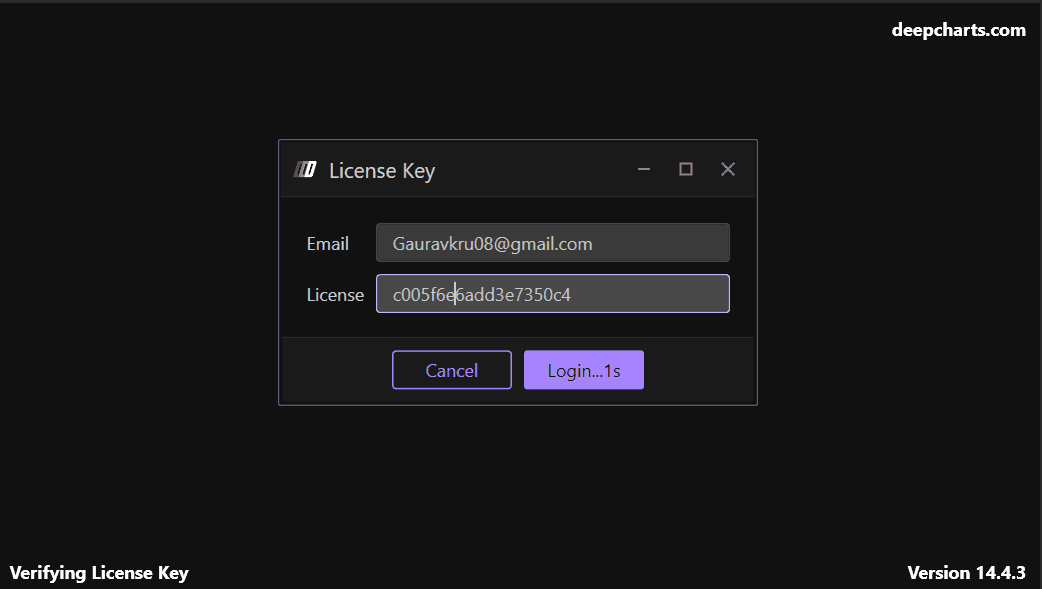
Inserisci le seguenti informazioni:
E-mail: L'indirizzo email con cui sei registrato su my.deepcharts.com
Chiave di licenza: Il codice alfanumerico presente nel tuo account su my.deepcharts.com
Crea la tua prima connessione
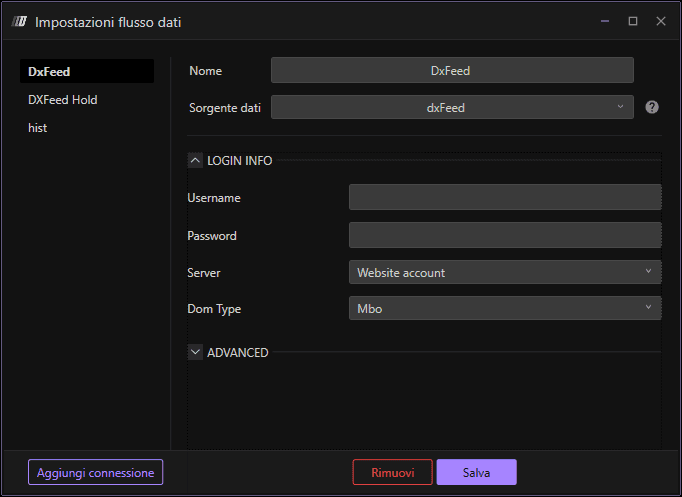
Inserisci le credenziali del tuo Data Feed, fornite dal tuo broker, dalla tua prop firm o dal tuo fornitore di dati. Quindi seleziona i mercati da associare alla tua connessione.
Campi di configurazione:
Nome connessione: Un nome per la tua connessione al feed dati
Origine dati: Seleziona il tuo feed dati
Nome utente: Il tuo nome utente del fornitore di dati
Password: La tua password del fornitore di dati
Collega il feed dati & Apri il tuo primo grafico
Ora collega il Data Feed facendo clic su Salva
Attendi che l'indicatore di connessione diventi verde, a conferma della connessione riuscita
Apri il tuo primo grafico facendo clic su Nuovo grafico
✓ Pronto a operare: Ora sei pronto per iniziare a utilizzare DeepCharts Desktop!
