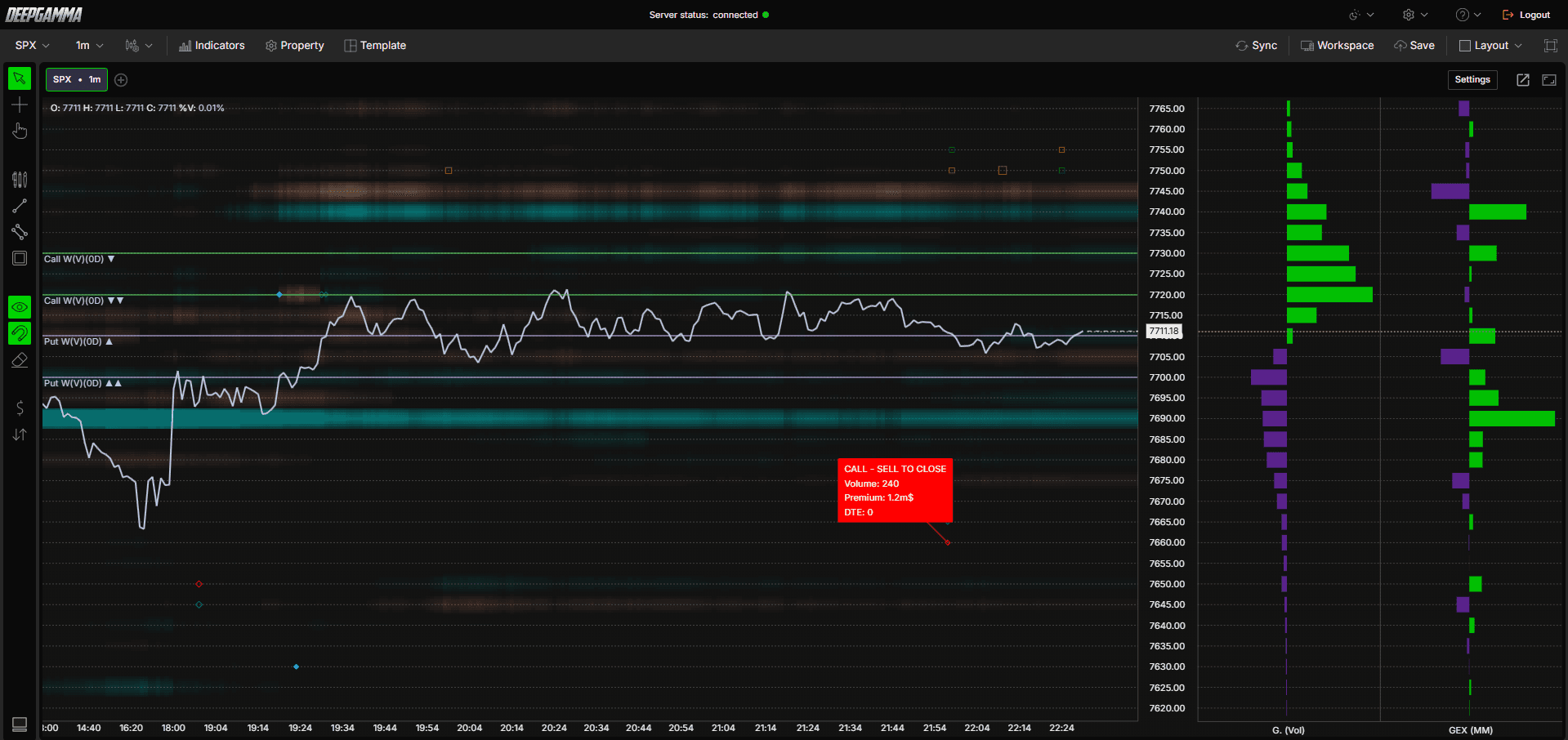
Option Big Flows funciona de forma similar a Big Trades, pero en el mercado de opciones. Dibuja marcadores en tu gráfico cada vez que se ejecuta una operación con una prima elevada, para ayudarte a identificar cuándo entra o sale del mercado un volumen importante de capital institucional o profesional a través de opciones. Cada marcador indica si el flujo corresponde a calls o puts, si fue una compra o una venta y si la posición se abrió o se cerró.

Nota: Option Big Flows utiliza datos del CBOE y solo muestra valores en gráficos de SPX.

Cómo añadir Option Big Flows
Abre un gráfico de SPX en DeepGamma Web
Haz clic en Indicators en la barra de menús
Haz clic en el botón verde Add indicator situado en la parte inferior del panel
Abre la pestaña Options (Cboe) y busca Option Big Flows
El indicador se añade a tu gráfico y aparece en el panel Indicators
Haz clic en el icono de engranaje junto a Option Big Flows para abrir sus ajustes

Cómo interpretar los marcadores
Option Big Flows utiliza dos formas de marcador para distinguir entre calls y puts:
Rombo - Flujo de calls
Cuadrado - Flujo de puts
Cada marcador también indica si la posición se abrió o se cerró:
Marcador relleno - Apertura de posición
Marcador hueco - Cierre de posición
El color indica el sentido de la operación. Por defecto, calls y puts usan colores distintos:
Compra de call - Azul
Venta de call - Rojo
Compra de put - Naranja
Venta de put - Verde
Conceptos clave
Antes de interpretar los marcadores, conviene entender algunos conceptos básicos sobre opciones:
Call - Una opción que da al comprador el derecho a comprar el subyacente a un precio fijado. Los traders compran calls cuando esperan que el precio suba
Put - Una opción que da al comprador el derecho a vender el subyacente a un precio fijado. Los traders compran puts cuando esperan que el precio baje
Prima - El importe total en dólares pagado por el contrato de opción, calculado multiplicando el precio del contrato por el volumen. El filtro Min. premium utiliza este valor para decidir qué flujos son lo bastante grandes como para mostrarse
Open - La operación abre una posición en opciones completamente nueva
Close - La operación cierra o reduce una posición en opciones existente
DTE (Days to Expiration) - El número de días que faltan para el vencimiento del contrato de opción. Un DTE de 0 significa que la opción vence ese mismo día
Cada combinación de call/put y compra/venta implica un sesgo de mercado distinto:
Comprar una call - Una operación alcista que apuesta por una subida del precio
Vender una call - Una operación bajista que apuesta a que el precio se mantenga por debajo del precio de ejercicio
Comprar una put - Una operación bajista que apuesta por una caída del precio
Vender una put - Una operación alcista que apuesta a que el precio se mantenga por encima del precio de ejercicio
Tenlo en cuenta al interpretar los marcadores, ya que una compra no siempre es alcista. Comprar una call es alcista, pero comprar una put es bajista, aunque técnicamente ambas sean una «compra».
Settings
La ventana de ajustes está organizada en secciones. Desplázate hacia abajo para verlas todas. Después de hacer cambios, haz clic en Apply para actualizar el gráfico.
General
Expiration - Filtra los flujos por vencimiento. Opciones disponibles: Default, 0 DTE, <= 1d, <= 2d, <= 3d, <= 4d, <= 5d, <= 6d, <= 7d, <= 31d, <= 91d, All expirations
Nota: cuando Expiration está configurado en Default, se utiliza el vencimiento seleccionado en Expirations de la barra de acceso rápido Settings.
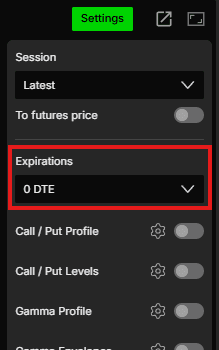
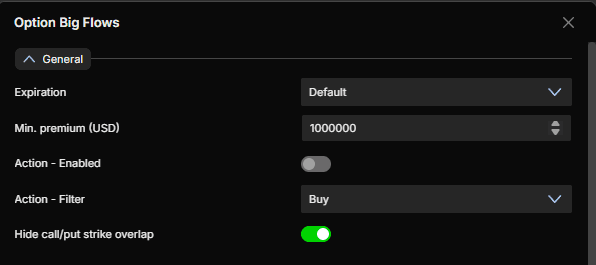
Min. premium (USD) - Establece el umbral mínimo de prima en USD. Solo se mostrarán los flujos que superen ese importe. El valor por defecto es 1000000
Action - Enabled - Activa este interruptor para filtrar los flujos por tipo de operación (Buy o Sell). Está desactivado por defecto
Action - Filter - Elige Buy o Sell cuando el filtro Action esté activado. La opción por defecto es Buy
Hide call/put strike overlap - Al activarlo, se ocultan las operaciones en las que se ejecutan simultáneamente una call y una put con el mismo precio de ejercicio. Suelen ser estrategias que se compensan y cuya exposición direccional neta es neutra. Desactívalo si quieres ver todos los flujos sin excepción. Está activado por defecto
Call Plot
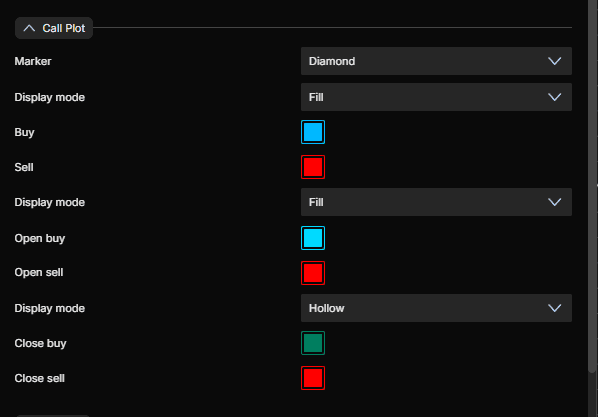
Marker - Elige la forma del marcador para los flujos de calls. Opciones disponibles: Circle, Square, Diamond, Text. La opción por defecto es Diamond
Display mode - Elige Fill o Hollow para los marcadores genéricos de calls. La opción por defecto es Fill
Buy - Color del flujo de compras de calls. Azul por defecto
Sell - Color del flujo de ventas de calls. Rojo por defecto
Display mode - Elige Fill o Hollow para los marcadores de apertura de posición. La opción por defecto es Fill
Open buy - Color de las compras de calls para abrir posición. Azul claro por defecto
Open sell - Color de las ventas de calls para abrir posición. Rojo por defecto
Display mode - Elige Fill o Hollow para los marcadores de cierre de posición. La opción por defecto es Hollow
Close buy - Color de las compras de calls para cerrar posición. Verde oscuro por defecto
Close sell - Color de las ventas de calls para cerrar posición. Rojo por defecto
Put Plot
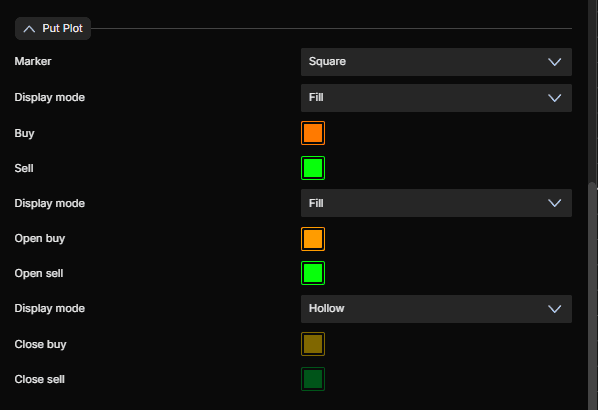
Marker - Elige la forma del marcador para los flujos de puts. Opciones disponibles: Circle, Square, Diamond, Text. La opción por defecto es Square
Display mode - Elige Fill o Hollow para los marcadores genéricos de puts. La opción por defecto es Fill
Buy - Color del flujo de compras de puts. Naranja por defecto
Sell - Color del flujo de ventas de puts. Verde por defecto
Display mode - Elige Fill o Hollow para los marcadores de apertura de posición. La opción por defecto es Fill
Open buy - Color de las compras de puts para abrir posición. Naranja por defecto
Open sell - Color de las ventas de puts para abrir posición. Verde por defecto
Display mode - Elige Fill o Hollow para los marcadores de cierre de posición. La opción por defecto es Hollow
Close buy - Color de las compras de puts para cerrar posición. Amarillo oscuro por defecto
Close sell - Color de las ventas de puts para cerrar posición. Verde oscuro por defecto
Size Settings
Text Size - Establece el tamaño de fuente cuando el tipo de marcador sea Text. El valor por defecto es 12
Text Color - Establece el color del texto. Blanco por defecto
Marker Min Size - Tamaño mínimo del marcador. El valor por defecto es 60
Marker Max Size - Tamaño máximo del marcador. El valor por defecto es 120
Marker Max Std Dev - Controla la escala del tamaño de los marcadores con respecto a la desviación estándar de la prima. El valor por defecto es 1

Ejemplo - Cómo usar Option Big Flows
Una vez añadido al gráfico, verás aparecer marcadores cada vez que una operación grande de opciones supere tu umbral Min. premium. Esta es una forma sencilla de utilizarlos:
Un rombo azul relleno cerca de un nivel clave indica una compra importante de calls para abrir posición, a menudo una señal alcista que conviene vigilar por una posible continuación del movimiento
Un cuadrado naranja relleno en una resistencia indica una compra importante de puts para abrir posición, a menudo una señal bajista que sugiere que el capital institucional se está posicionando para una caída
Los marcadores huecos indican cierres de posiciones, lo que puede señalar que se está deshaciendo el flujo anterior o que un trader está recogiendo beneficios
Las agrupaciones de marcadores del mismo color alrededor de un mismo nivel de precio pueden destacar una zona donde se concentra una actividad institucional importante, útil como nivel en el que vigilar posibles reacciones
Usa el filtro Min. premium para centrarte solo en las operaciones más grandes y eliminar el ruido de los flujos más pequeños, de tamaño típico de los minoristas
También puedes combinar Option Big Flows con otros indicadores para obtener más contexto:
Combínalo con Option Levels u Option Envelopes para ver si los flujos grandes se agrupan cerca de niveles gamma existentes, lo que puede dar más peso a esos niveles
Combínalo con Option Profile para comprobar si un flujo grande coincide con un call wall o un put wall existente, ya que el flujo cerca de un muro establecido puede reforzarlo
Combínalo con Option Gex Heatmap para ver si un flujo grande coincide con un cambio en la exposición de los dealers en ese precio de ejercicio
¿Tienes alguna pregunta?
Nuestro equipo de soporte está disponible 24/7 para ayudarte con cualquier consulta.
Cuando nos contactes, incluye:
Una captura de pantalla (si la tienes)
Describe brevemente la ayuda o el soporte que necesitas
Soporte en directo de DeepCharts - Habla directamente con nuestros agentes mediante la ventana de chat en www.deepcharts.com, o haz clic aquí para acceder de inmediato al chat en directo 24/7.
Soporte por correo electrónico - Escríbenos a support@deepcharts.com - ten en cuenta que las respuestas por correo electrónico pueden tardar un poco más que las del chat de soporte en directo.
