Updated:
1. How to Enable Keyboard Shortcuts
Go to the Options section and access Settings
Move to the Shortcuts column
From this window you can configure various keyboard shortcuts to simplify and speed up the use of the platform.

2. Window Shortcuts
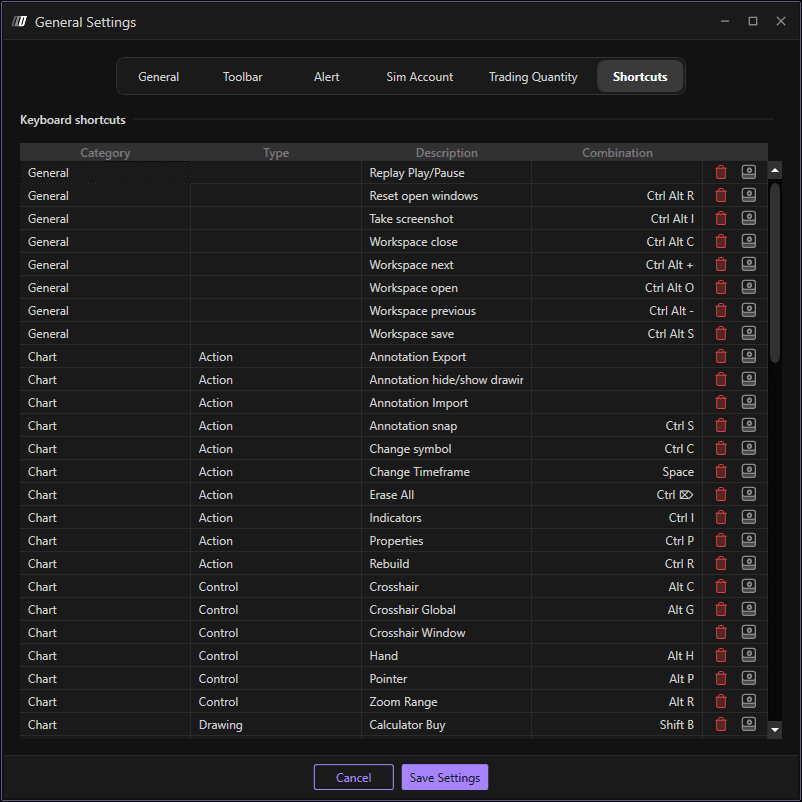
Shortcuts are divided into categories and types:
3. Category
General: For general platform functionality
Chart: For chart-related functions
4. Type of Shortcut
Action: Execute specific functions
Control: Control platform behavior
Drawing and Annotation: Drawing tools and annotations
Scroll: Navigation and scrolling functions
Trading: Trading-related operations
5. Shortcut Description
This column contains the configured key combination.
6. Configuration Buttons
Delete: Button to delete the saved combination
Register: Button to register a new combination
7. To Create a New Shortcut
Click on Register
Record the desired combination on your PC keyboard
Once the new shortcut is configured, click on Save Settings to save the changes
The new shortcuts are now active and ready to use in Deepcharts.
