Updated:
Panoramica
Se lo zoom del grafico non funziona in DeepChart, il problema è di solito مرتبطo alle scorciatoie da tastiera, al comportamento della rotella del mouse o alle impostazioni di sistema di Windows. DeepChart supporta diversi modi per zoomare l’asse X e l’asse Y del grafico.

Come zoomare i grafici in DeepChart
1. Scorciatoie da tastiera (zoom asse X)
Zoom avanti (asse X):
Ctrl + +Zoom indietro (asse X):
Ctrl + -
Queste scorciatoie regolano l’asse orizzontale (tempo) del grafico.
2. Zoom con la rotella del mouse (consigliato)
L’uso di un mouse esterno con rotella di scorrimento offre la migliore esperienza.
Scorri la rotella del mouse in qualsiasi punto del grafico:
→ Zooma l’asse X (scala temporale)Tieni premuto
Alt+ scorri la rotella del mouse:
→ Zooma l’asse Y (scala dei prezzi)
Lo zoom con la rotella del mouse non funziona?
Segui i passaggi qui sotto.
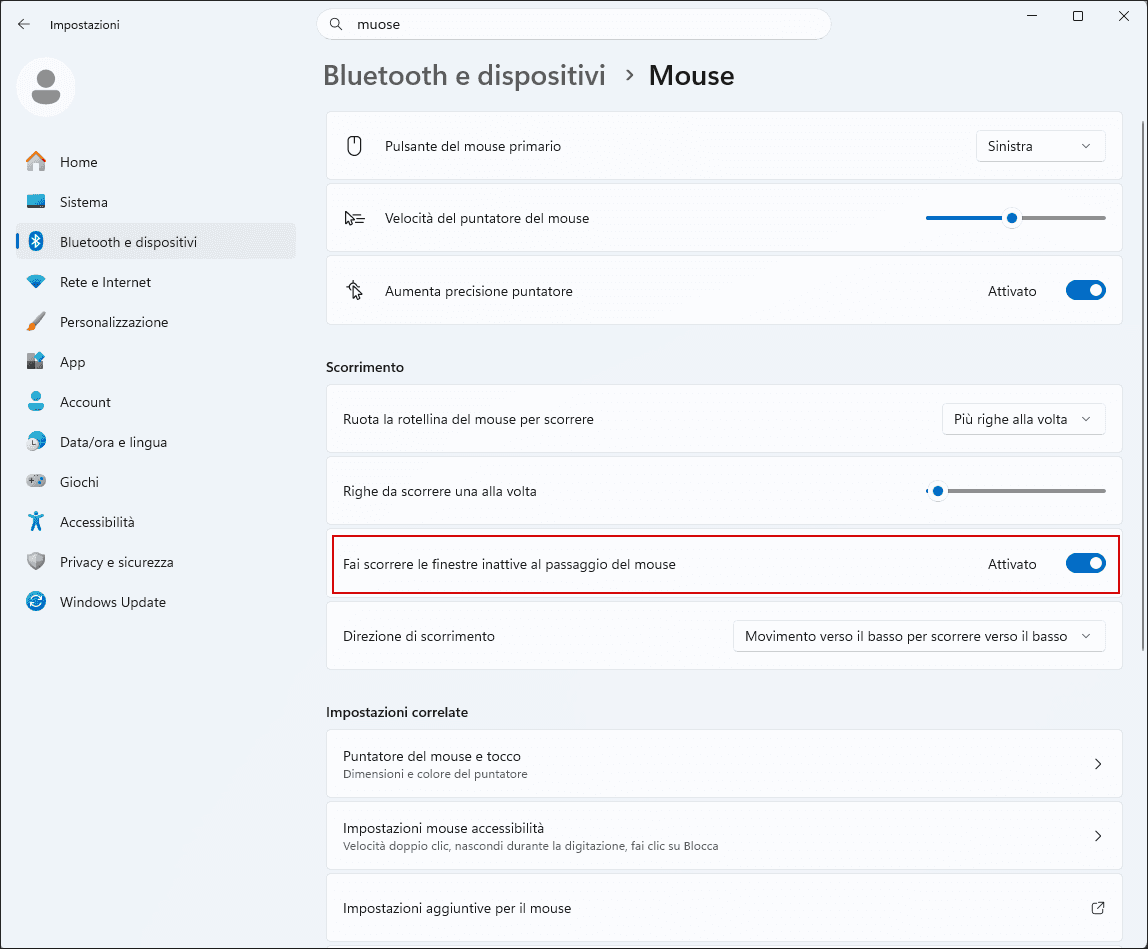
Soluzione 1: abilita “Scorri le finestre inattive” in Windows
DeepChart richiede questa funzione di Windows per rilevare correttamente lo scorrimento della rotella del mouse.
Passaggi:
Apri Impostazioni di Windows
Vai su Bluetooth e dispositivi → Mouse
Abilita l’opzione:
“Scorri le finestre inattive quando passi sopra di esse”
📌 Assicurati che questo interruttore sia ATTIVO, come mostrato nell’immagine di riferimento.
Dopo averlo abilitato:
Riavvia DeepChart
Prova di nuovo lo zoom usando la rotella del mouse
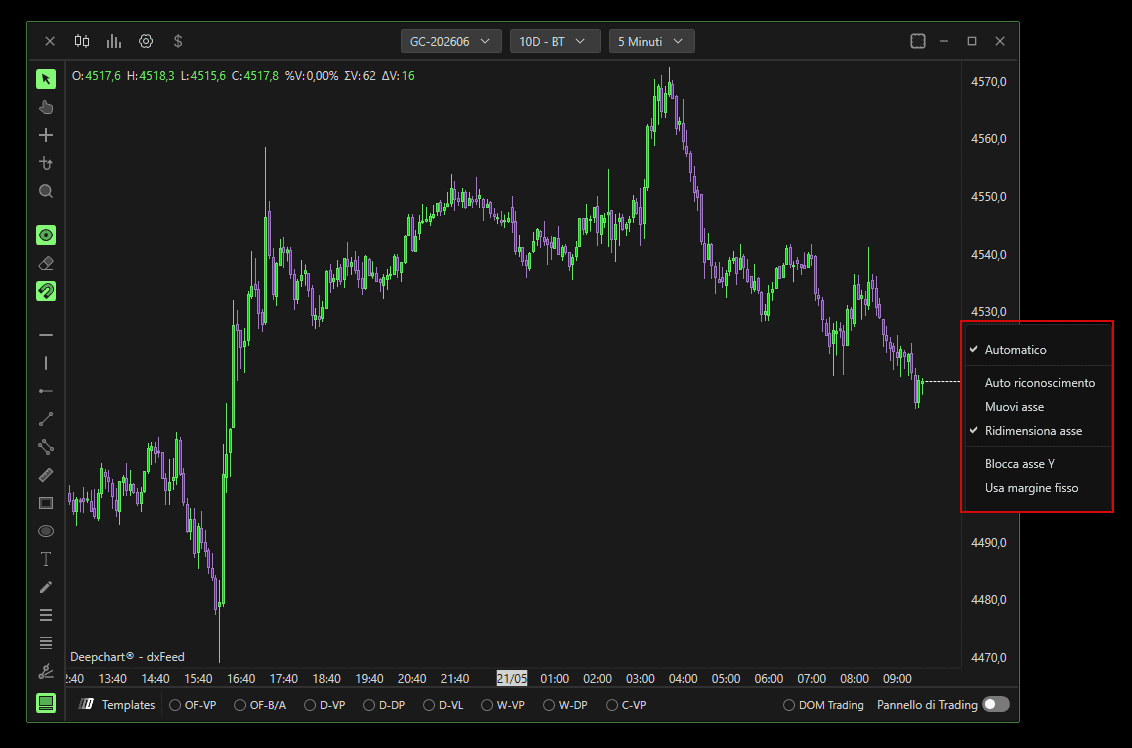
Soluzione 2: controlla le impostazioni della scala dell’asse Y
Impostazioni errate dell’asse Y possono impedire lo zoom verticale.
Passaggi:
Fai clic con il tasto destro sull’asse Y (scala dei prezzi) del grafico
Assicurati che le opzioni della scala siano impostate correttamente, come mostrato nell’immagine di riferimento:
Applica le modifiche e riprova lo zoom
Buone pratiche per uno zoom fluido
Usa un mouse esterno invece di un trackpad
Evita di eseguire DeepChart all’interno di sessioni desktop remote
Mantieni le impostazioni del mouse di Windows ai valori predefiniti
Assicurati che nessun software mouse di terze parti stia sovrascrivendo il comportamento della rotella
Riepilogo
Azione | Risultato |
|---|---|
Ctrl + / Ctrl - | Zoom asse X |
Scorrimento con la rotella del mouse | Zoom asse X |
Alt + rotella del mouse | Zoom asse Y |
Abilita lo scorrimento delle finestre inattive | Risolve i problemi di zoom con il mouse |
Controlla le opzioni della scala dell’asse Y | Ripristina lo zoom verticale |
