Indicators

Updated:

Feb 21, 2026

Templates and Workspaces

Templates and Workspaces

No headings found on page

In DeepCharts, you can save your chart layouts and configurations using Templates and Workspaces.
This feature helps you avoid reconfiguring your charts every time you launch the platform

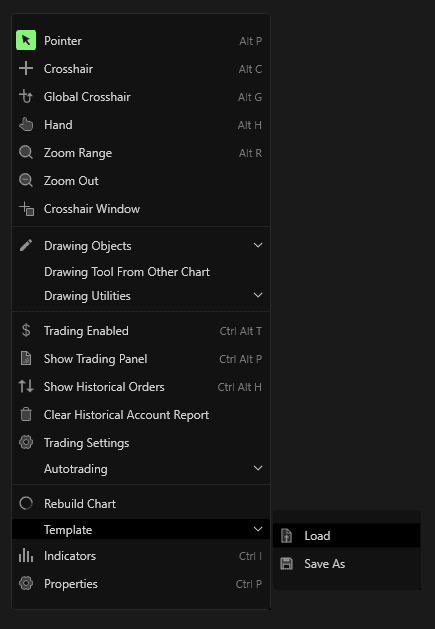
  • Templates store the chart’s current setup — including indicators, styles, and settings.
    You can save or load templates by right-clicking anywhere on the chart and selecting the Load or Save Template options.
  • Workspaces store your entire layout, including multiple charts, indicators, and profiles. You can save and load workspaces from the workspace management panel.
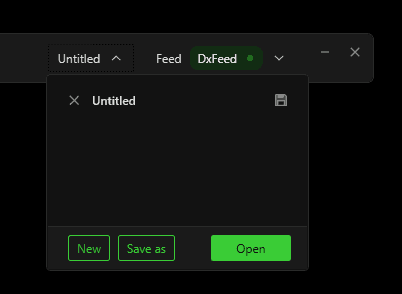
Both templates and workspaces can be saved locally or to the cloud, allowing you to easily restore your preferred configurations at any time.

Tools for futures, currency & options involves substantial risk & is not appropriate for everyone. Only risk capital should be used for trading.

Testimonials appearing on this website may not be representative of other clients or customers and is not a guarantee of future performance or success.

Tools for futures, currency & options involves substantial risk & is not appropriate for everyone. Only risk capital should be used for trading. Testimonials appearing on this website may not be representative of other clients or customers and is not a guarantee of future performance or success.

Deepcharts © 2026 All right reserved

Tools for futures, currency & options involves substantial risk & is not appropriate for everyone. Only risk capital should be used for trading. Testimonials appearing on this website may not be representative of other clients or customers and is not a guarantee of future performance or success.

Deepcharts © 2026 All right reserved