Updated:
Panoramica
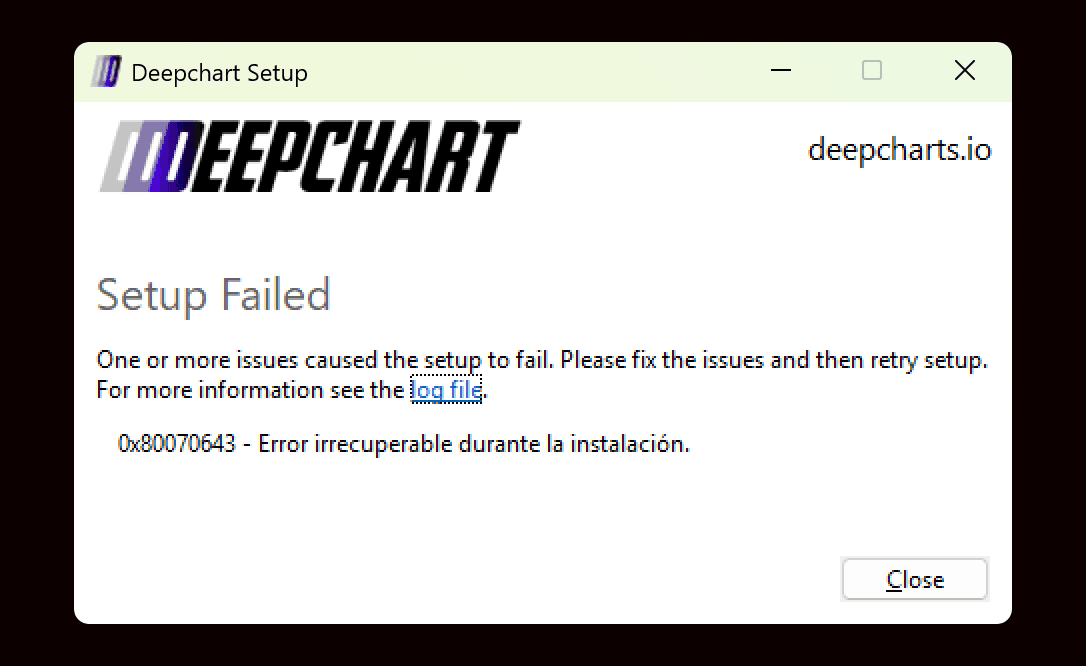
Alcuni utenti potrebbero incontrare un errore “Installazione non riuscita” durante l’installazione di DeepChart su Windows. Questo accade in genere perché mancano componenti di sistema richiesti oppure non sono compatibili.
Quando appare questo errore, puoi fare clic su File di log nell’installer per visualizzare informazioni dettagliate sul motivo per cui la configurazione non è riuscita.

Come diagnosticare il problema
Passaggio 1: esamina i log dell’installer
Nella finestra di errore dell’installazione, fai clic su File di log
Esamina il log per identificare il motivo del fallimento
Se i dettagli del log non sono chiari o sono difficili da comprendere, puoi inviare il file di log al supporto DeepChart per ulteriori verifiche.
Cause comuni e soluzioni
Causa 1: la lingua di sistema non è inglese
Descrizione
L’installazione di DeepChart e alcune delle sue dipendenze richiedono che la lingua di sistema di Windows sia impostata su inglese.
Se la lingua del PC è impostata su un’altra lingua, l’installer potrebbe non riuscire inaspettatamente.
Soluzione
Modifica la lingua di visualizzazione e la lingua di sistema di Windows in inglese
Riavvia il PC
Esegui di nuovo l’installer di DeepChart
✅ Questo risolve i problemi di installazione per molti utenti.
Causa 2: Microsoft Visual C++ Redistributable mancante o non aggiornato
Descrizione
DeepChart richiede l’ultima versione di Microsoft Visual C++ Redistributable per installarsi ed eseguirsi correttamente. Se manca o non è aggiornata, l’installer potrebbe non riuscire.
Soluzione: installa l’ultima versione di Visual C++ Redistributable
Se non sei sicuro dell’architettura del tuo sistema, installa entrambe le versioni X86 e X64.
Architettura | Link per il download | Note |
|---|---|---|
ARM64 | Ultima versione ARM64 supportata | |
X86 (32 bit) | Richiesto anche su alcuni sistemi a 64 bit | |
X64 (64 bit) | Include i binari ARM64 e X64 |
Passaggi
Scarica il/i pacchetto/i Visual C++ richiesto/i
Installa il/i pacchetto/i
Riavvia il PC
Esegui di nuovo l’installer di DeepChart
Causa 3: problema di SlimDX (rendering grafico)
Descrizione
DeepChart utilizza SlimDX per il rendering grafico. In rari casi, problemi a livello di sistema con la grafica o con DirectX possono impedire il completamento corretto dell’installazione.
Opzioni di soluzione
Opzione 1: installa DeepChart su un altro PC
Se possibile, prova a installare DeepChart su una diversa macchina Windows.
Opzione 2: installazione pulita di Windows
Se non hai accesso a un altro PC:
Esegui una installazione pulita di Windows
Installa gli aggiornamenti di sistema e i componenti richiesti
Reinstalla DeepChart
Questo risolve il problema nella maggior parte dei casi legati a SlimDX.
Quando contattare il supporto
Se il problema persiste dopo aver seguito i passaggi sopra:
Raccogli il file di log dell’installer
Contatta il supporto DeepChart
Allega il file di log così il team potrà approfondire l’analisi
Note finali
Riavvia sempre il PC dopo aver installato le dipendenze di sistema
Avoidare l’esecuzione simultanea di più installer
Mantieni Windows e i driver grafici aggiornati
